

DESIGNER Product History
DESIGNER - What's new
Listed below are the previous releases of DESIGNER, to view what features where introduced in each of the releases click the buttons below.
-
DESIGNER 2026.3
DESIGNER 2026.3 introduces a range of workflow improvements and new capabilities designed to make CAD preparation faster, more intuitive and more efficient. From a streamlined import experience and enhanced hole creation to improved sheet metal workflows and bending setup, this release helps designers and manufacturing teams spend less time managing processes and more time getting work done.
Faster Import Experience
Importing and exporting CAD data is now simpler with a streamlined, silent workflow. Geometry can be imported directly through drag-and-drop without interrupting the user with import dialogs, while advanced import options remain available through an optional settings workflow when required. This faster out-of-the-box experience reduces unnecessary steps, giving users quicker access to their geometry and making everyday CAD data exchange less disruptive, particularly for new and occasional users.
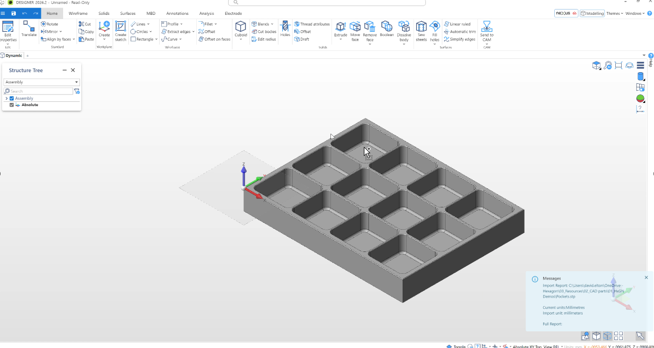
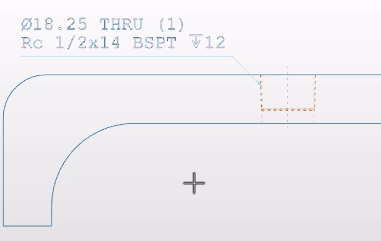
New Hole Command – Conical Tapping
The new Hole command expands tapping capabilities with support for BSTP, NPT, NPTF and FLUSH SEAL NPT standards. Users can create conical tapped holes through the same familiar workflow used for regular threads, with a greater range of available sizes than the legacy hole command and the flexibility to define custom depths. The new functionality also integrates with Note 3D and Text Leader commands and is supported in 2D Drawings, providing a more consistent design-to-documentation workflow. Legacy hole commands remain available under preview for continued access during the transition.
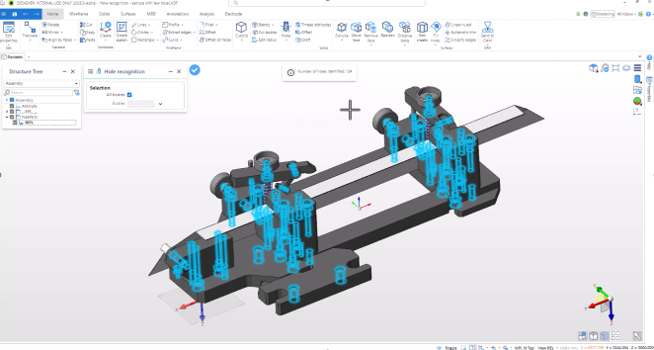
Hole Recognition
Hole Recognition automatically identifies hole geometries in existing models and converts them into recognised features. This helps users quickly prepare imported or existing geometry for further design changes, reducing manual feature creation and making model preparation more efficient.
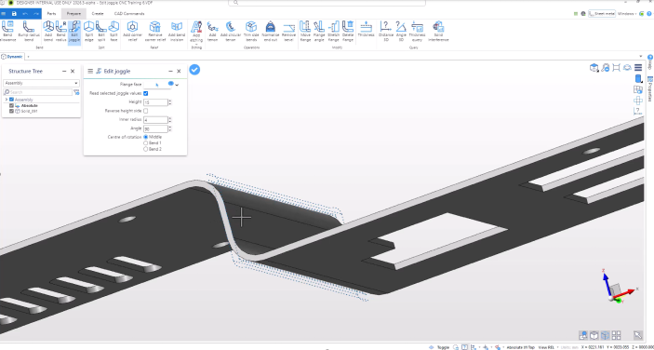
Edit Joggle Command
The Edit Joggle command now recognises existing joggle geometry, making it easier to identify and modify joggle features within sheet metal designs. This provides a more efficient editing workflow when working with parts that already contain joggle geometry.
Unfolding Thickness Tolerance
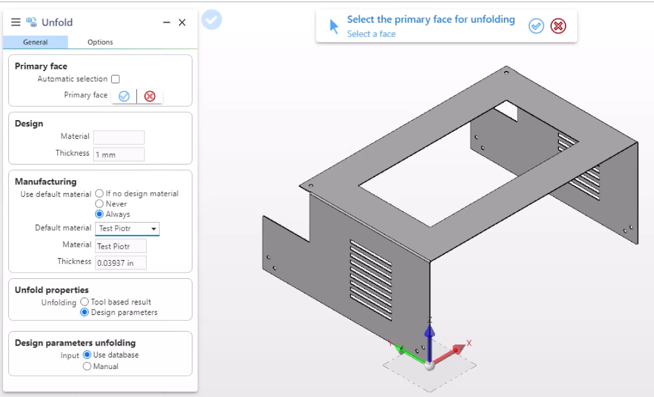
Unfolding has been enhanced with greater control over thickness matching and manufacturing requirements. Users can now work with separate design and manufacturing thickness values, including metric-to-inch compatibility when matching thicknesses. Global settings can be defined and overridden directly from the Unfold command, while UI improvements make the workflow clearer. The Create Part command has also been updated, with improved controls for height, radius and angle inputs, selection of the fixed flange, and bend-line positioning for non-90-degree joggles based on the centre of rotation.
Pattern Command
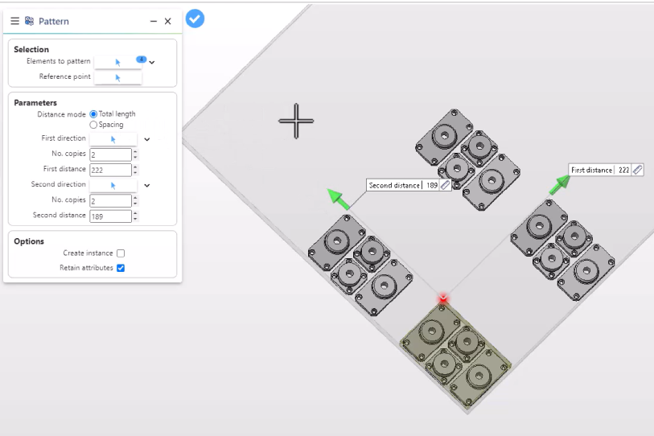
The Pattern command now enables users to generate patterns of solids in two directions, providing greater flexibility when creating repeated geometry. Users can define either the total length of the pattern or the spacing between instances, making it easier to create regular arrangements while maintaining control over the final result.
Analytic Curve
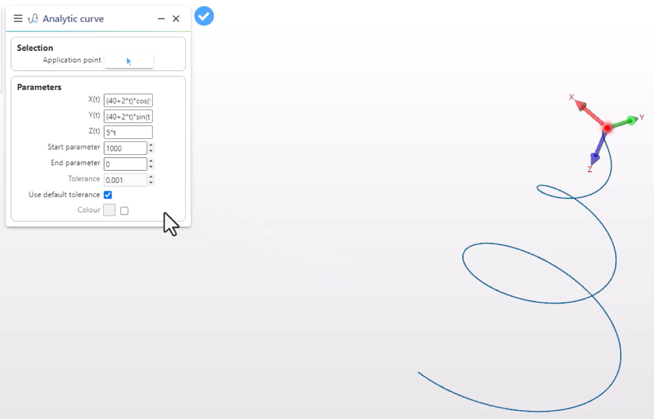
The new Analytic Curve capability allows users to generate curves whose coordinates are defined as functions of a parameter, t. Start and end parameter ranges can be specified, providing greater control when creating mathematically defined curves for specialised design and manufacturing applications.
Streamlining the Bending Setup Process
Fast Part Setup for Operators and Programmers
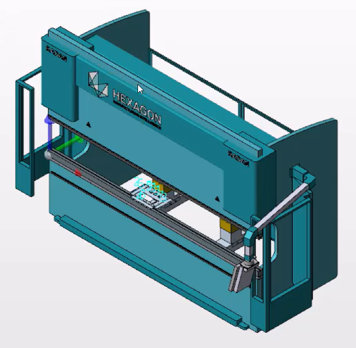
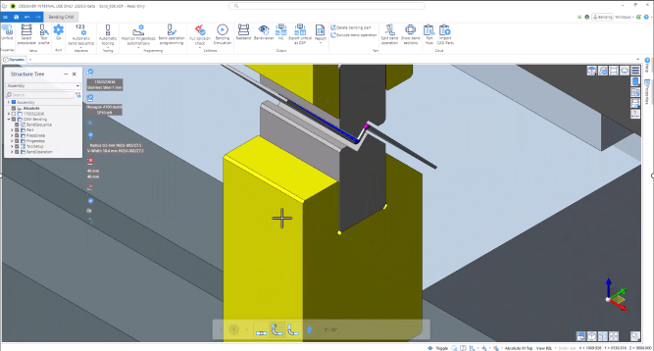
The bending setup workflow has been streamlined to reduce the number of manual steps required to get a part ready for production. Parts can be imported and opened without an intrusive Import dialogue, while parts opened in the Bending workspace are automatically unfolded using the last-used material, or the first available material when no previous selection exists. The pressbrake is similarly selected automatically based on the last-used machine, or the first machine in the list. If a part cannot be unfolded, the process simply continues without automation rather than interrupting the user. Incorrect material or pressbrake selections can also be changed quickly by running the command again, giving operators and programmers a faster path from part import to bending setup.
Utilising Joggle Tools
DESIGNER 2026.3 expands bending capabilities with specialised support for joggle tooling. Joggle tools can now be incorporated into the bending process, helping customers make greater use of their existing tooling libraries while reducing manual work. Joggle bends can also be simulated, allowing users to validate the intended operation and understand whether the planned program will work before it reaches the machine.
Editing and Producing a Setup Report
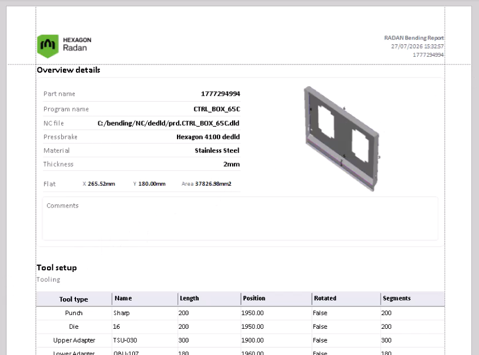
Setup reporting in Radan Bending is enhanced with a familiar DevExpress reporting experience. Reports can be edited directly using the DevExpress interface and are delivered natively, eliminating the need to install additional reporting software. Users can generate reports independently from NC code or produce them alongside NC code, with images automatically generated within the reports. This provides a more flexible way to document bending setups and communicate essential production information to the shop floor.
-
DESIGNER 2026.2
Smarter Hole Annotations for Clearer Manufacturing Communication
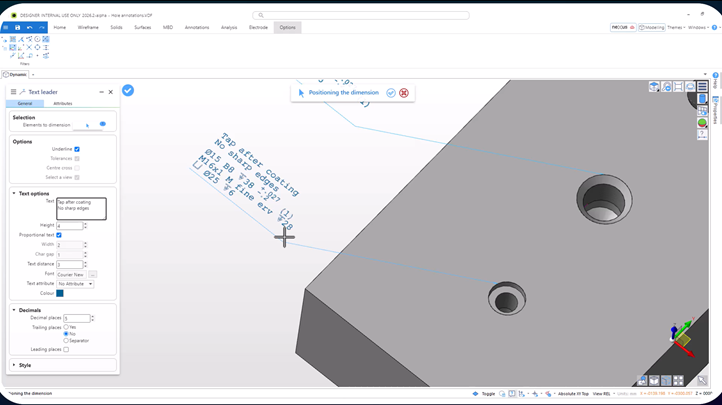
Creating and managing hole annotations is now easier and more flexible with the new Hole Command enhancements. Support for 3D Notes, Text Leaders, and industry-standard symbols enables users to communicate manufacturing intent more clearly without relying on lengthy text strings. Working seamlessly in both 2D and 3D environments, annotations can be independently modified and customized to meet specific documentation requirements. The result is cleaner drawings, improved readability, and more efficient communication between design and manufacturing teams.
Automatic Recognition of I-Beams and H-Beams
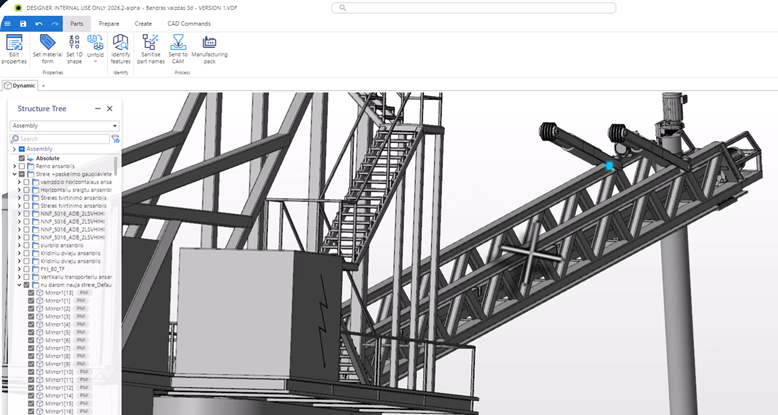
DESIGNER 2026.2 expands shape recognition capabilities with support for flanged steel profiles, including I-Beams and H-Beams. Users can automatically identify these common structural components or manually define them when required. Integrated directly within the Set Material Form command, all profile dimensions are automatically transferred to Manufacturing Pack XML outputs. This reduces manual data entry, improves consistency, and streamlines downstream manufacturing processes.
Improved Sheet Metal Manufacturing with Automatic Incisions
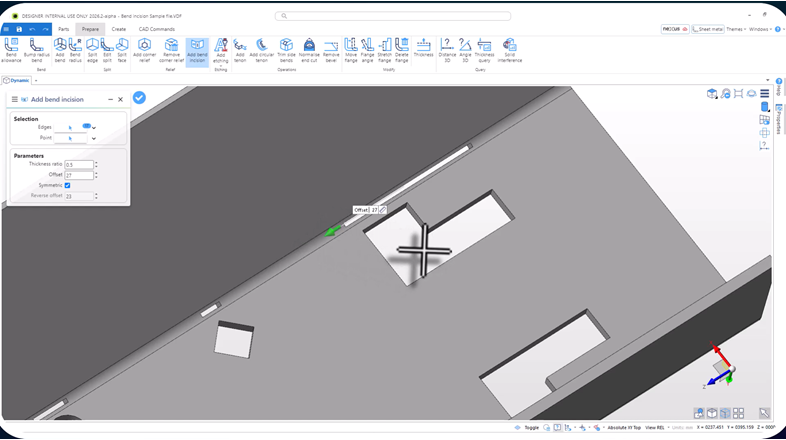
Manufacturing sheet metal parts with features close to bend zones is now more reliable thanks to new incision support. DESIGNER automatically generates and sizes bend relief incisions based on material thickness, helping prevent deformation and ensuring accurate production of apertures near bends. By automating what was previously a manual process, users can achieve more consistent results while reducing preparation time and potential manufacturing issues.
A Modernised Right-Click Experience
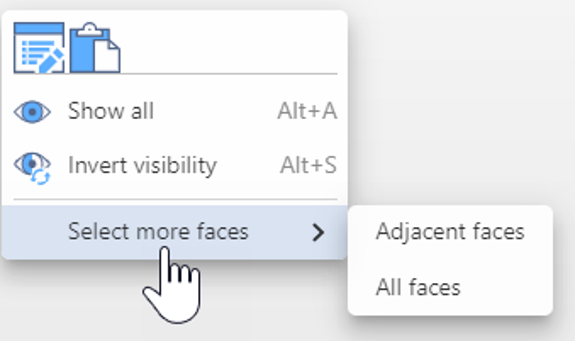
The right-click workflow has been redesigned to provide a cleaner and more intuitive user experience. Legacy dialog elements have been removed, double-click actions have been optimized, and selection options have been simplified for easier discovery. Powered by a modern React-based context menu, users can access the commands they need faster and with less interface clutter. The result is a smoother workflow that allows users to focus on design rather than software navigation.
More Workspace, Less Clutter with Floating Tiles
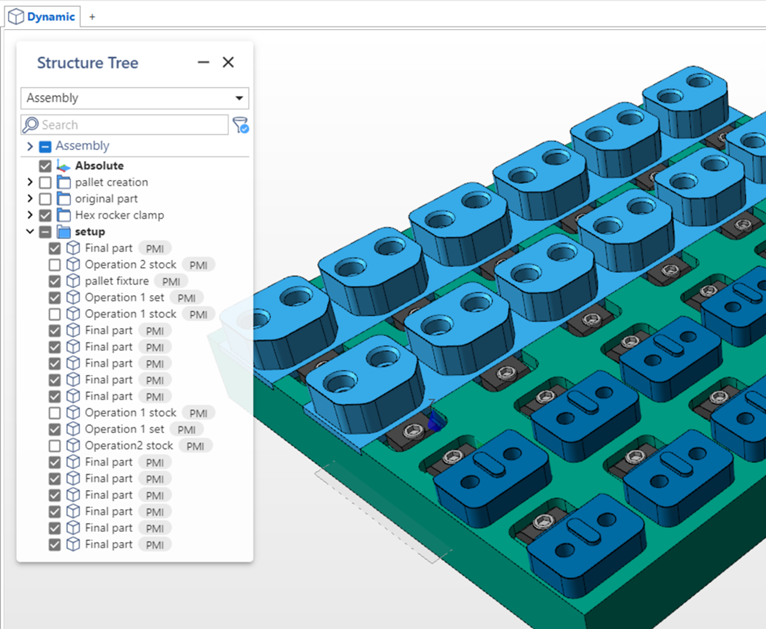
A new floating tile framework introduces a more flexible and responsive workspace. The Structure Tree now resides within a floating tile that automatically adapts to content and window size, reducing unused screen space and improving layout efficiency. By maximizing the available graphics area and creating a cleaner working environment, users can focus more effectively on their designs while benefiting from a modern and consistent interface experience.
Reorder Bending Elements in Structure Tree
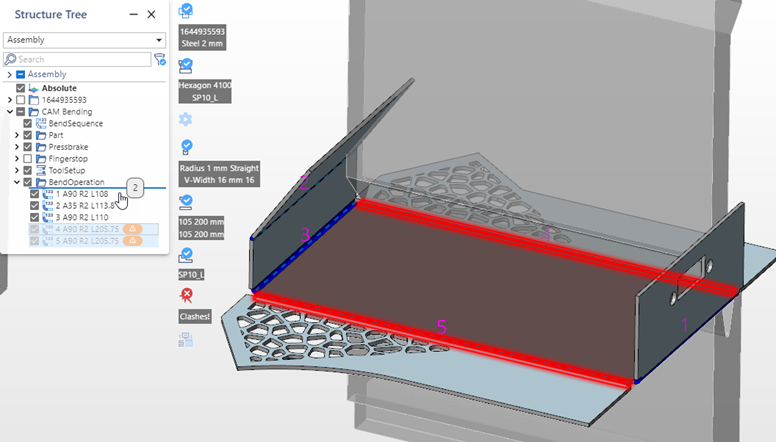
Adjusting bend sequences is now quicker and more intuitive. Users can simply drag and drop one or multiple bend operations within the Structure Tree to reorder manufacturing sequences. Parts and programs update automatically, while collision and warning statuses are refreshed instantly. This provides immediate feedback during process planning, helping users optimize bend sequences with confidence and reducing the time required to prepare parts for production.
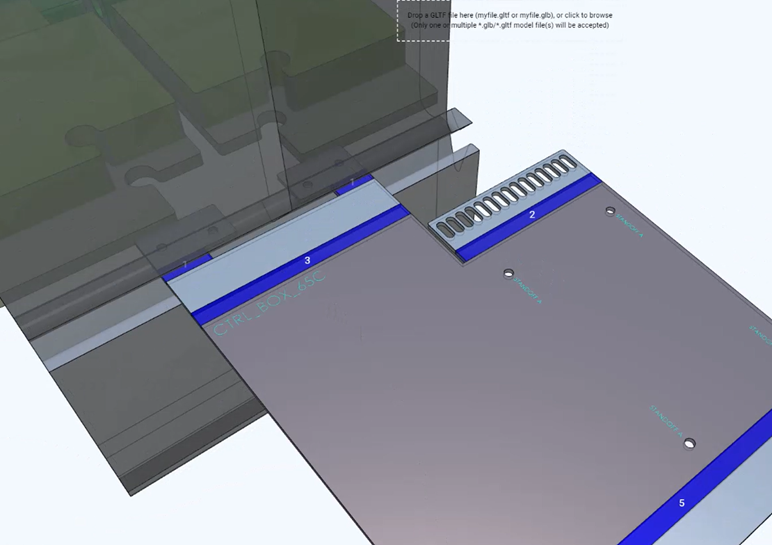
Etching Displayed in Bending Workspace
Etching and marking operations are now fully visible within the Bending Workspace and throughout bend simulation. Markings are included in NC-code output, BendViewer, and generated images, providing a consistent representation across the entire workflow. By making etched features easier to identify, operators and programmers can quickly determine part orientation and top-face identification, improving clarity and reducing the risk of production errors.
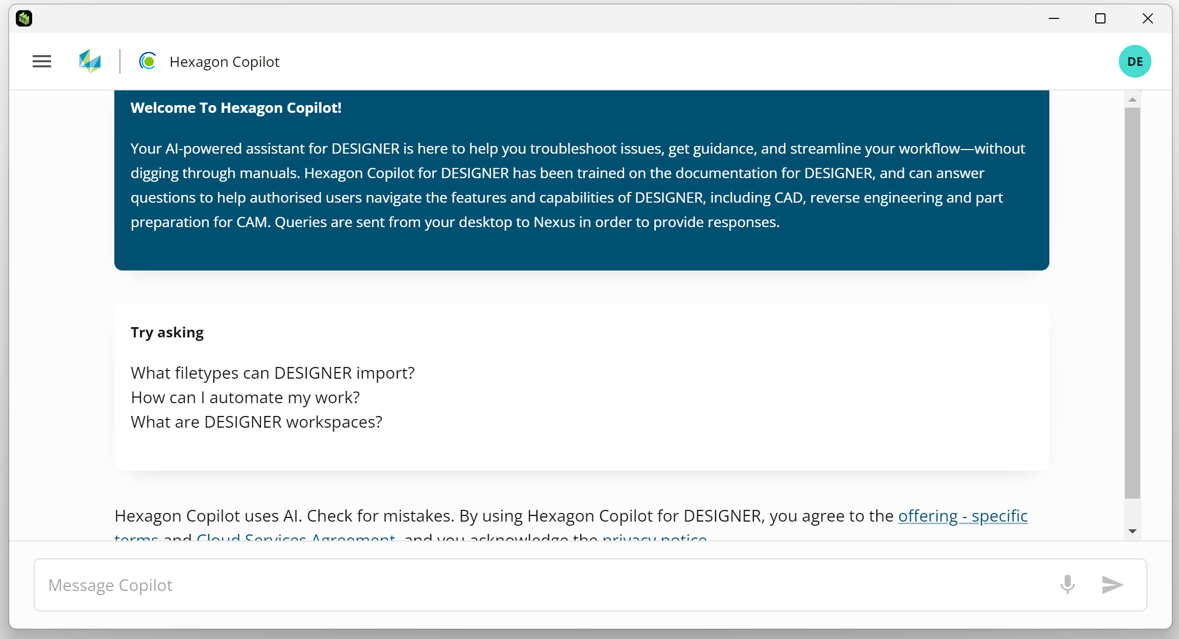
Hexagon Copilot Now Available to All Users
Hexagon Copilot is now generally available within DESIGNER, providing users with instant access to AI-powered assistance. Whether learning a new command, exploring workflows, or finding answers to product questions, users can interact with Copilot through natural conversations. This intelligent assistant helps reduce onboarding time, accelerates learning, and enables users to become productive faster while getting more value from their software investment.
-
DESIGNER 2026.1
Manufacturing teams rely on CAD tools that are fast, practical, and built for real production workflows. DESIGNER 2026.1 introduces enhancements designed to make everyday tasks easier, from quickly finding commands to working more efficiently with hole features and manufacturing preparation. This release focuses on improving usability, reducing manual effort, and helping users move from design to machining faster.
Find the right command faster with the new search experience
DESIGNER 2026.1 introduces a powerful new search experience that helps users quickly locate and access commands. With discovery mode, favourites, and recently used commands, users can navigate the software more efficiently and spend less time searching through menus.
The search capability adapts to the way individuals work, allowing simple customization so users can prioritise the tools they use most often. For users working with large toolsets or complex workflows, this enhancement improves productivity by keeping essential tools only a few keystrokes away.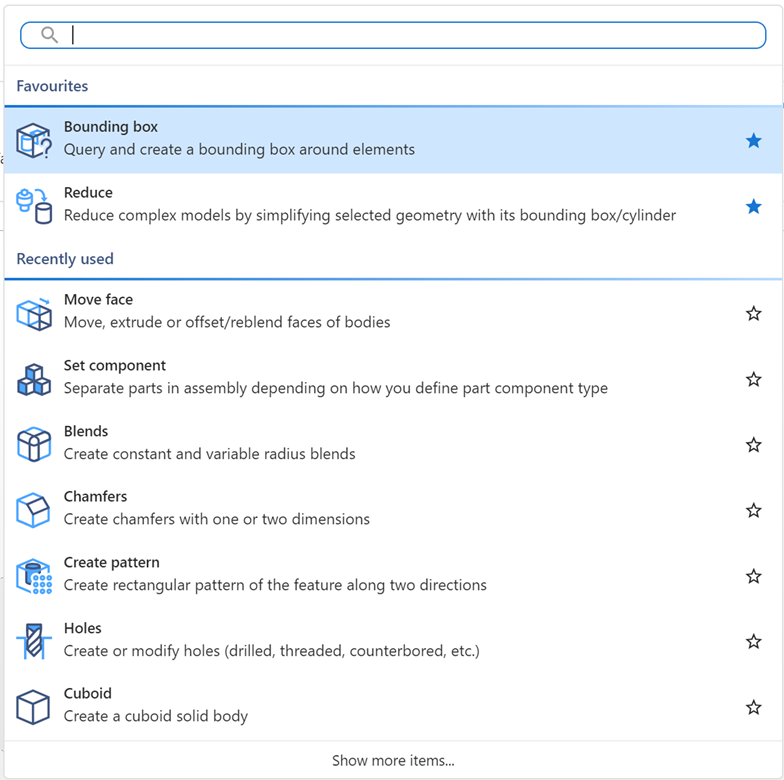
Smarter editing of hole features
DESIGNER 2026.1 expands support for working with hole features across new, legacy, and imported geometry. The system automatically reads existing hole data and uses it to prepopulate commands, making it faster and easier to modify or reuse hole definitions.
Users can select and filter hole features directly from the model or feature tree, making editing more intuitive and efficient. By intelligently matching legacy hole definitions and reusing existing data, this capability reduces manual work while improving model quality and consistency.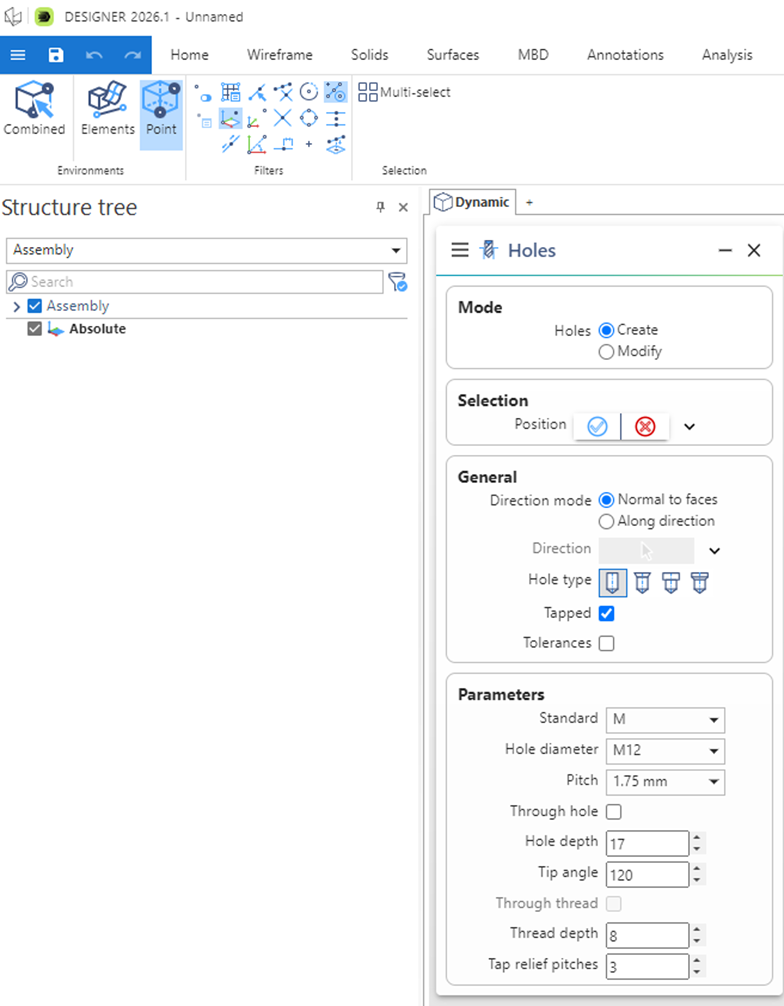
Additional improvements
DESIGNER 2026.1 also introduces several practical enhancements designed to simplify common tasks in manufacturing preparation.
- Improved material form recognition now automatically detects 1D and 2D forms in sheet metal parts.
- A new part name etching command provides a simple way to engrave part identifiers directly into sheet metal components for easier tracking during production.
- For structural design, the mortise straighten capability improves manufacturability when working with circular hollow sections by simplifying mortises for angled tenons.
- The dialog usability has been improved with automatic hiding of unused panels, allowing users to focus only on the options relevant to their task.
Together, these updates create a cleaner and more efficient user experience while reducing the time required to prepare models for manufacturing.
-
DESIGNER 2025.4
DESIGNER 2025.4 focuses on helping users work smarter and deliver more robust models with less effort. This release introduces two preview capabilities, Hexagon CoPilot and enhanced hole features, both designed to reduce friction in daily workflows while improving overall model quality and downstream usability.
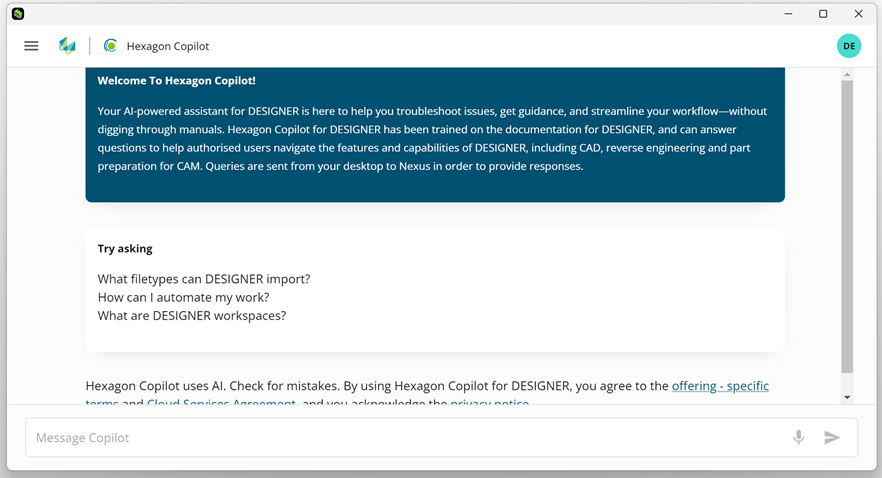
Hexagon Copilot
Hexagon CoPilot is now available in DESIGNER via a preview license and Nexus login, bringing intelligent, in-product guidance directly into the user’s workflow. Users can interact with a chatbot to ask questions, receive contextual help, and discover relevant commands and workflows without leaving the software. This significantly reduces the time spent searching for answers, lowers frustration during everyday tasks, and helps users uncover capabilities they may not have explored before. For new and returning users, CoPilot shortens onboarding time, while experienced users benefit from faster access to advanced workflows. Teams also gain value by reducing the need for formal training and ongoing support dependency.
Hole features
The new hole features in DESIGNER 2025.4 enhance feature-based modeling to deliver clearer, more reliable hole definitions across the model. Support for feature-based PMI and labels, improved filtering, and automatic through-hole type detection based on geometry help users better understand and manage complex hole data. Users can now delete individual hole features, apply thread attributes consistently, and identify defective hole features earlier in the design process. These improvements reduce manual corrections and rework, strengthen model robustness, and ensure higher-quality feature data for downstream manufacturing and inspection workflows, particularly for CAM preparation and production use.
Together, these preview enhancements reinforce DESIGNER’s role as a dependable foundation for manufacturing-driven design, helping users learn faster, model with greater confidence, and pass on cleaner, more trustworthy data to the next stages of the production process. -
DESIGNER 2025.3
DESIGNER 2025.3 – Smarter, Faster, More Connected CAD for Manufacturing
The latest release of DESIGNER 2025.3 delivers major new improvements to streamline workflows, enhance accuracy, and empower manufacturers with even more powerful sheet metal tools.
Alongside a wide range of enhancements, this release also introduces RADAN Bending, now fully integrated into DESIGNER. Manufacturers can now take advantage of a seamless workflow for off-line press brake programming, right inside DESIGNER.
From creating 2D drawings to managing sketches and programming press brakes, this release is built to save you time, reduce errors, and connect your workflow.Modelling Enhancements
Faster 2D Drawings for Complex Parts
Creating and editing 2D drawings is now much quicker, especially for assemblies and multibody parts. A new structure tree makes it easy to manage views, while part visibility controls allow you to update views without disturbing existing annotations. This means you can work faster and more confidently, even with complicated drawings.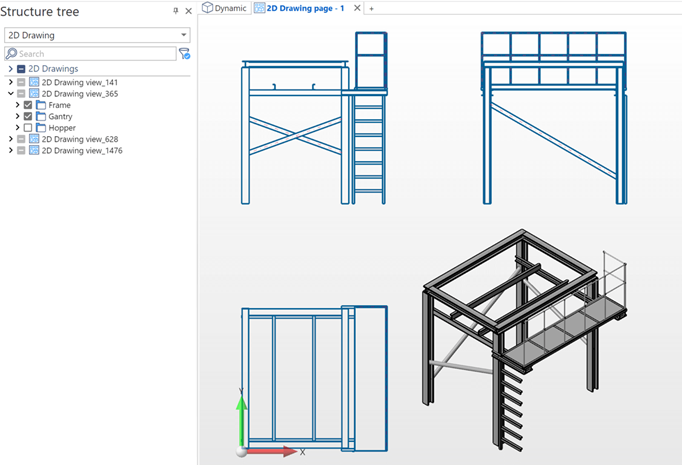
Constraint Sketching Enhancements
Sketching is more intuitive with automatic coincident constraints and clearer point styles. DESIGNER now applies common constraints automatically, reducing manual effort and helping you maintain cleaner, more accurate sketches. The updated point display is easier to see, giving you better control over your designs.
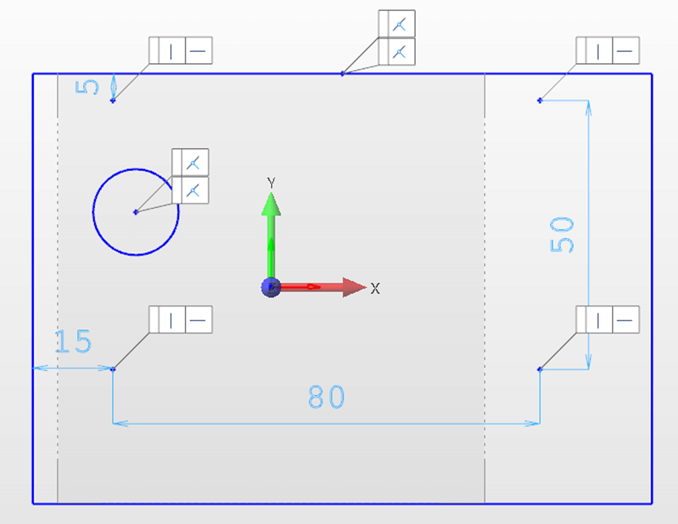
More Flexible Hole Creation
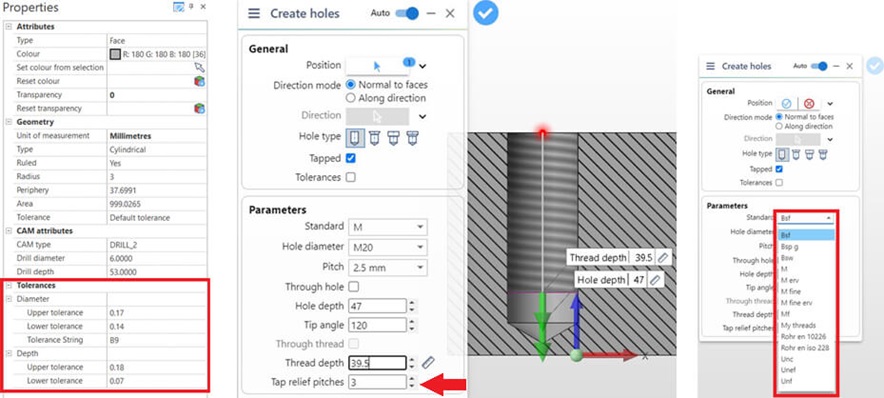
Working with holes is simpler and more precise thanks to updated standards and new tolerancing options. Design holes with greater accuracy and consistency, using standards that match your shop’s requirements. With these enhancements, hole creation is faster, more consistent, and less prone to mistakes.- Legacy thread standards converted to XML
- New tolerances for diameter and depth
- Tap relief option
- Improved point picking and error feedback
Better Sheet Metal Visualisation
A new sheet metal settings section allows you to control the colors and visibility of faces, flanges, and bends. This gives you clearer views of your sheet metal parts and ensures seamless integration with RADAN 3D workflows. By customising your view, you can spot issues earlier and work more efficiently.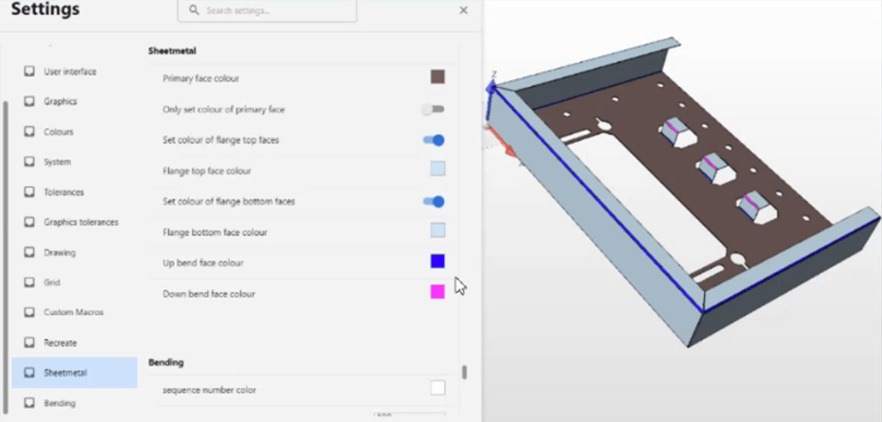
RADAN Bending Inside DESIGNER
A major milestone in this release is the full integration of RADAN Bending. You can now program press brakes directly within DESIGNER, unfolding parts with speed and accuracy while capturing expert operator knowledge in a digital twin environment. By proving manufacturability before cutting, you reduce errors, avoid costly prototypes, and keep your machines running with confidence.General Enhancements
Modernised Backstage Experience
Behind the scenes, DESIGNER has moved away from legacy interface technology and onto a modern frontend framework. While this change doesn’t add new user functions right now, it lays the foundation for a more stable, secure, and future-ready application. You’ll benefit from ongoing improvements built on a supported, modern UI system.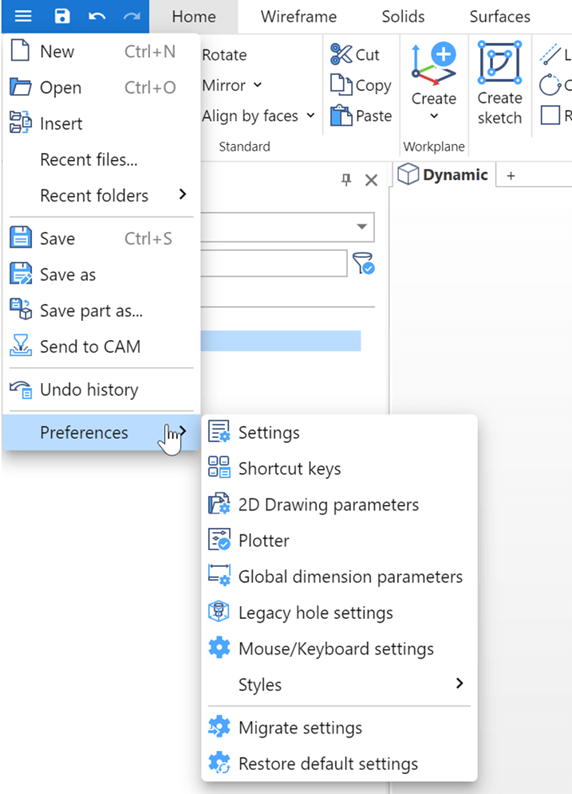
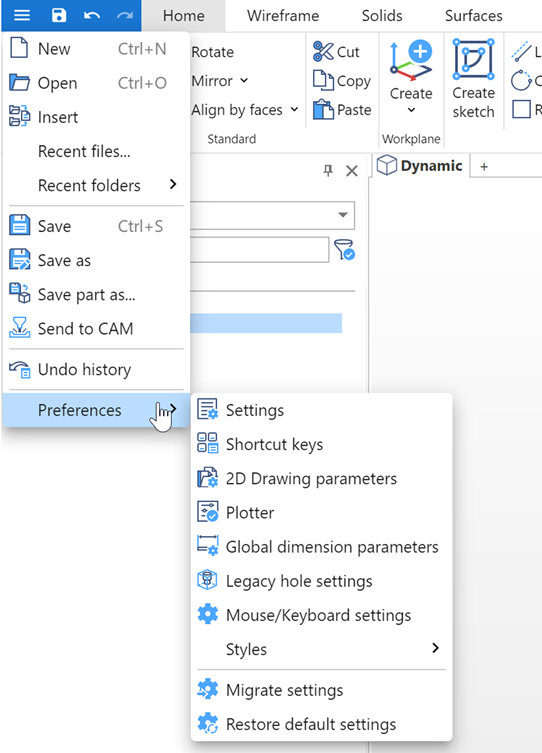
Quicker Access to Recent Files & Preferences
Finding your most-used files and settings is now easier than ever. A streamlined dropdown menu gives you quick access to recent files and folders, while a new flyout for preferences keeps your workflow moving without interruptions. The result is smoother navigation and faster multitasking.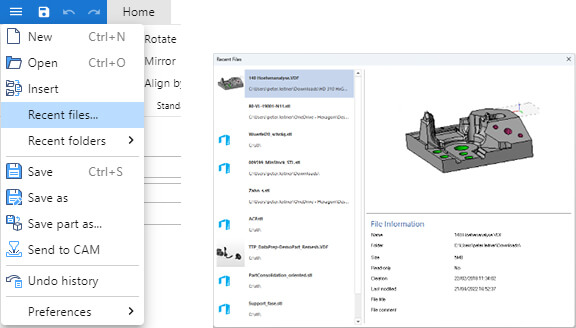
Get started with DESIGNER 2025.3 today. -
DESIGNER 2025.2
DESIGNER 2025.2: Smarter part preparation. Faster performance. Smoother experience.
The latest release of DESIGNER 2025.2 update is packed with features designed to simplify your workflows and elevate your design experience.
DESIGNER 2025.2 introduces meaningful improvements that save time, enhance usability, and deliver greater control over part preparation workflows. Whether you're modelling features, unfolding sheet metal, or using multiple workspaces, this release makes everything faster and more intuitive.
Top Features at a Glance- New Holes Command: Easily create all standard hole types with threading support.
- Sketch Constraints UX Enhancements: More intuitive and flexible 2D sketching.
- Bend Count Export: Automatically include bending data in quotations via RADAN Quoting.
- Migratable User Settings: Upgrade without losing custom configurations.
- Simplified Workspace Switching: Double-click to swap views instantly.
- Modern Interface Streamlining: Key tools moved to the main UI for quicker access.
Modelling Enhancements
New Holes Command
DESIGNER 2025.2 introduces a dedicated command to create holes with greater ease and precision. You can now quickly define hole types such as drill, countersink, counterbore, and counterdrill, with the option to include threading (tapped) information. This tool replaces legacy workflows, offering better reliability and usability. The result is faster modelling with fewer clicks, particularly beneficial for machining-focused users who rely on accurate feature creation.
New Holes Command in DESIGNER 2025.2 with options for countersink, threading, hole depth, and improved precision for machining.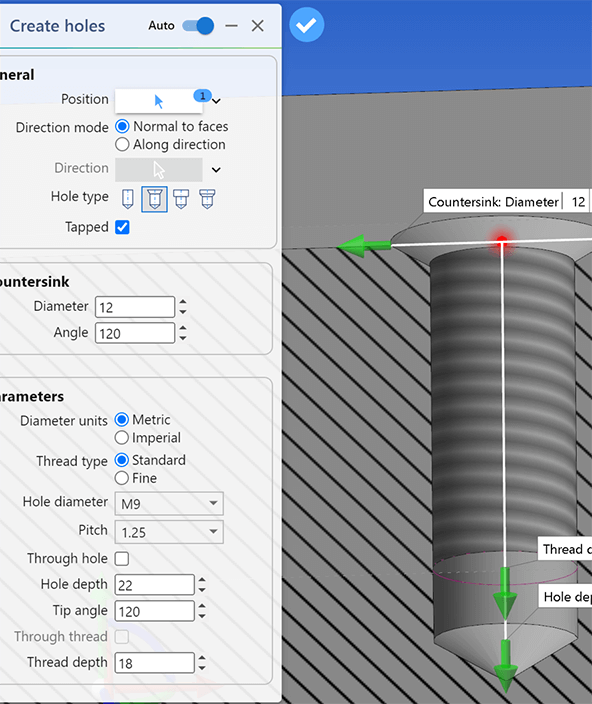
Enhanced Constraints Sketching
Creating and editing sketches is now much more efficient. Users can double-click to activate a sketch, update dimensions quickly, and precisely position angle constraints. Unnecessary icons are hidden by default, creating a cleaner view. These enhancements are designed to support both experienced users and those coming from history-based systems, making sketching in DESIGNER feel natural and productive.
Enhanced Constraints Sketching in DESIGNER 2025.2 with cleaner view, quick dimension updates, and precise angle constraint positioning.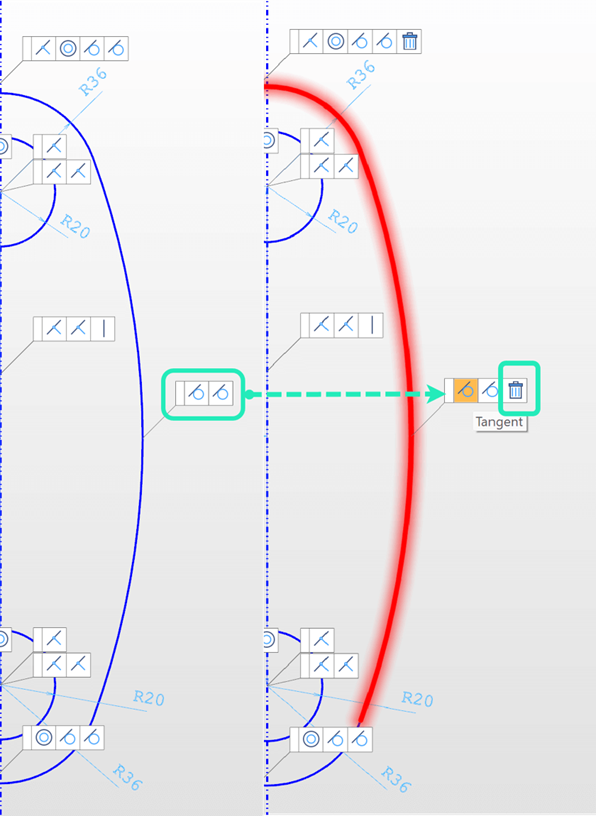
Sheet Metal: Export Bend Counts
Bend data is now automatically exported from the unfolder, providing accurate inputs for quoting in RADAN. This includes total bend count, upfold/downfold operations, and key dimensions like bend radii, angle, and length. By incorporating bending operations into cost estimates, users can avoid underquoting and ensure they’re compensated accurately for their work. It’s a simple yet powerful way to improve quoting accuracy and job profitability.
General Enhancements
Performance Boost: Faster Start-Up
Users will notice a significant speed improvement when launching DESIGNER—up to 60% faster on first run and up to 35% faster on subsequent opens. This means less waiting and more doing, particularly for those working with large or complex datasets.Migratable User Settings
All remaining custom settings—mouse/keyboard layouts, background colours, and more—are now carried forward automatically when upgrading. The new unified Settings dialog is searchable and provides live visual feedback. This ensures a smooth transition between versions and simplifies configuration management.
Migratable User Settings in DESIGNER 2025.2 with a unified, searchable settings dialog and automatic transfer of custom configurations.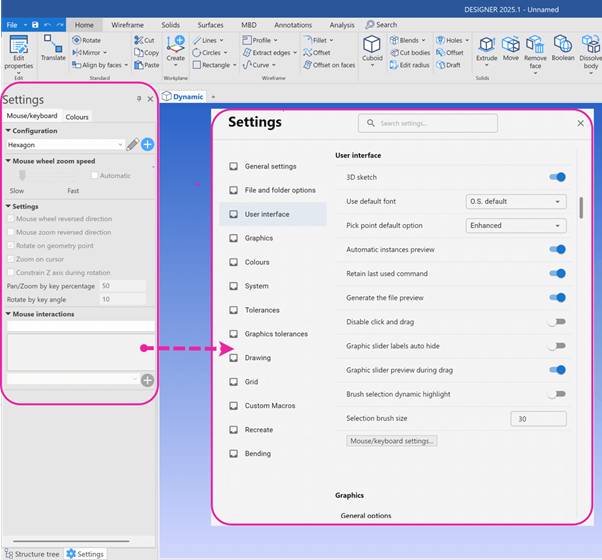
Faster Workspace Switching
A double-click is now all it takes to change workspaces. This eliminates the need to apply each workspace manually and makes it much quicker for users who frequently shift between different working modes or environments.
Faster Workspace Switching in DESIGNER 2025.2 with double-click functionality for quick transitions between workspaces.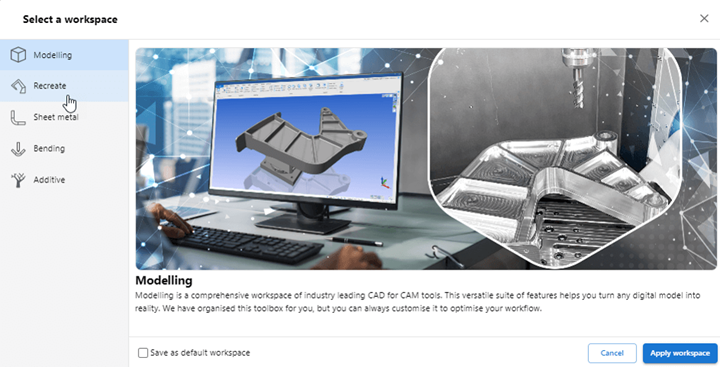
Streamlined User Interface
Common functions have been moved out of the backstage area and into the main window. This reduces clicks, lowers the learning curve for new users, and creates a more focused interface. By surfacing frequently used tools and reducing clutter, DESIGNER is evolving into a more intuitive, user-focused environment.
Streamlined User Interface in DESIGNER 2025.2 with common functions moved to the main window for easier access and reduced clutter.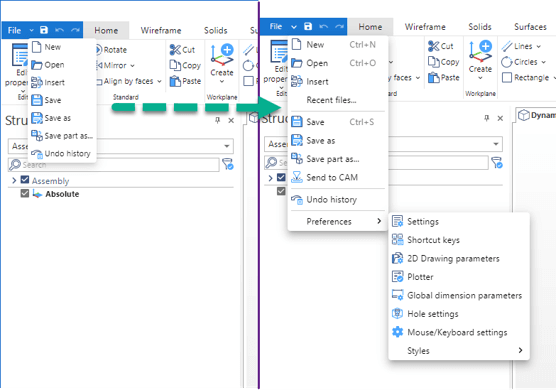
Commands Retain Minimized State
If a command is minimized during an active session, the next command opened will also appear minimized. This preserves user preferences during a session, offering a consistent experience across commands.Wireframe Colour Modifiers
New colour modifiers in wireframe commands allow users to define colours as they draw, making it easier to distinguish geometry during creation and downstream use. This enhances visual clarity and reduces the need for post-editing.
Instructional Diagrams in Commands
User guidance has been improved with diagrams now embedded in commands like ‘Set 1D shape.’ These visuals make it easier to input the correct values and understand command behavior, especially for less frequent users or those learning the software.
DESIGNER 2025.2 gives you more than new features, it delivers a refined user experience that reduces friction and increases efficiency. From modelling to quoting to performance, this release is packed with practical improvements that help manufacturers, machinists, and designers work faster, smarter, and with more confidence. -
DESIGNER 2025.1
DESIGNER 2025.1: Unlock New Levels of Efficiency and Precision
The latest release of DESIGNER 2025.1 update is packed with features designed to simplify your workflows and elevate your design experience.
DESIGNER 2025.1 delivers new enhancements across Modelling, Recreate, Sheet Metal, and general usability. This release improves user experience, accelerates workflows, and boosts accuracy for a seamless design process.
Explore the latest updates below.Modelling Enhancements
Enhanced Constraint Sketching for faster and more intuitive design
A improved Constraint Sketching ribbon centralizes all constraints, making it easier to apply and edit constraints quickly. Graphical symbols provide clearer visibility, while selecting constraints highlights associated segments or points for better control. Users can now delete constraints with a single selection, drag labels within sketches, and toggle visibility as needed. Support for horizontal and vertical constraints between points enhances precision, making constraints faster and sketching more efficient.
Reduce Command – Simplify Complex Models in Seconds
Convert detailed machine models into simplified shapes instantly for digital twins, post-processors, and simulations. With multiple simplification modes such as Box, Cylinder, and Projection, along with alignment options, users can reduce model complexity while maintaining accuracy. This streamlined model preparation reduces processing time and enhances workflow efficiency.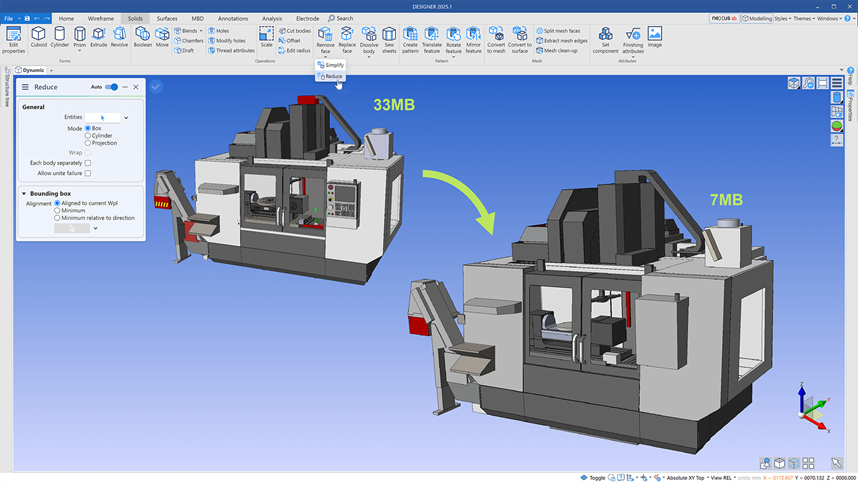
Recreate Enhancements
Auto-Surfacing Improvements for Faster Mesh Processing
Users can now preview mesh subdivision results before applying auto-surfacing, ensuring greater control over the final output. This option simplifies meshes when automatic surfacing fails, and the ability to re-mesh using the subdivision algorithm improves surface generation success rates. These enhancements provide greater flexibility and reliability when working with complex meshes.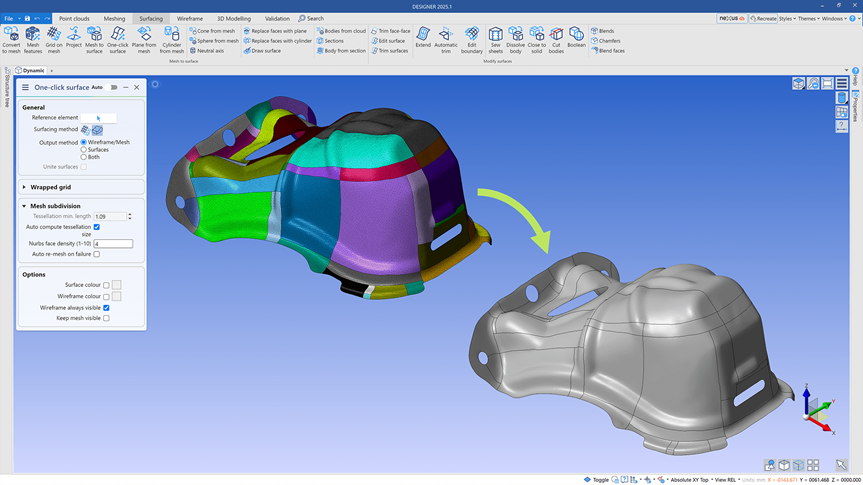
Optimised Re-Mesh for Improved Mesh Operations
The Optimise command now supports ‘Re-tessellate’ or ‘Re-mesh’ into a quad mesh, enabling smoother and more reliable mesh operations. By reducing workflow disruptions, this feature ensures users encounter fewer issues when working with meshes.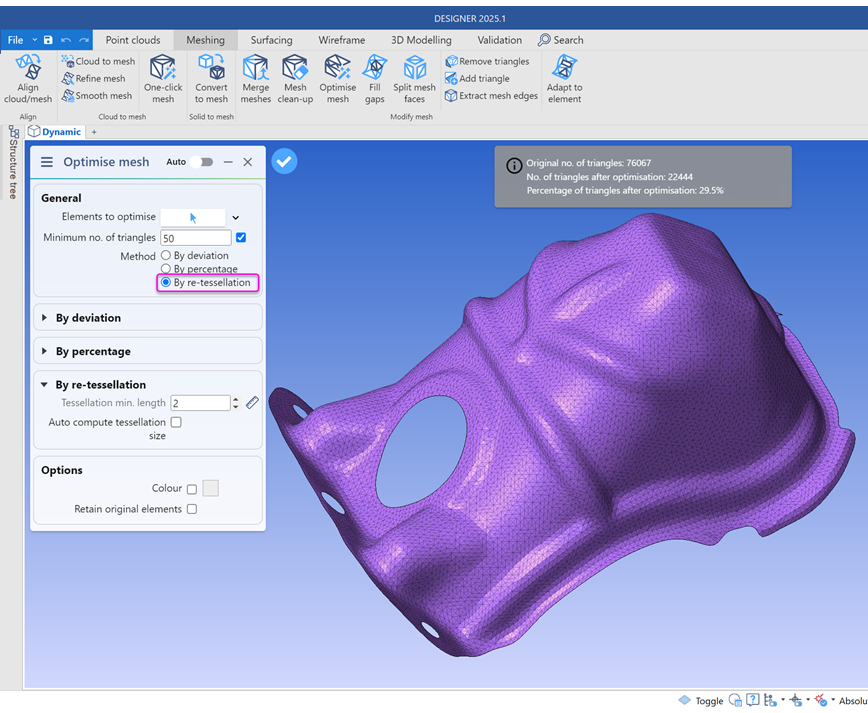
Migratable Recreate Settings for Seamless Upgrades
Recreate settings are now fully aligned with DESIGNER’s settings format and can be migrated between versions without disruption. This ensures that custom configurations persist across updates, making software upgrades seamless and maintaining user preferences.Sheet Metal Enhancements
Auto-Detect Equal-Leg and Unequal-Leg Angle Sections
The ‘Set 1D Shape’ command now automatically recognizes and supports angle sections in assemblies. This feature improves shape detection accuracy, with L-beams PMI displayed in the Properties Window and included in the BOM file. Width and depth parameters are also supported for 1D Other Sections, enhancing sheet metal workflows and increasing overall precision.
General Enhancements
- Simplified Settings Management – A single, searchable dialog now consolidates all settings, allowing for easier adjustments and seamless migration across versions.
- Updated Installer Branding – The software installer is now officially rebranded as DESIGNER for a more consistent and recognizable experience.
- Workspaces and Ribbon Customization – Enhanced customization options let users tailor the interface to their workflow, improving efficiency and usability.
Experience the power of DESIGNER 2025.1 and take your design workflows to the next level. Upgrade today to unlock these latest innovations!
-
DESIGNER 2024.4
The latest release of DESIGNER 2024.4 update is packed with features designed to simplify your workflows and elevate your design experience.
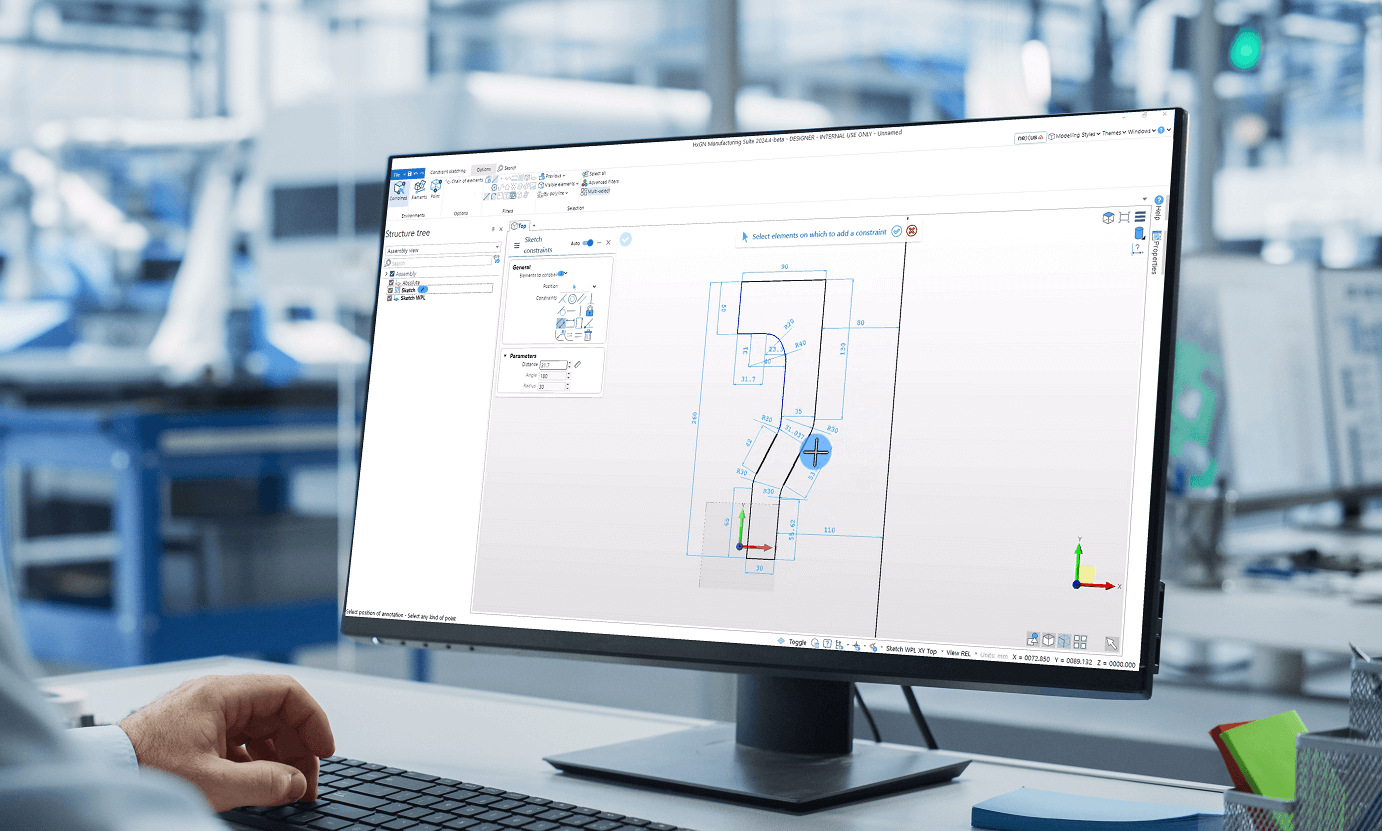
Constraint Sketching
Transform how you design with the improvements in Constraint Sketching, bringing speed in part creation.
- Automatic Constraints: Automatically applies horizontal, vertical, tangent, coincident, and more constraints, saving you time and effort.
- Effortless Dimension Selection: Quickly add dimensions with an intuitive, streamlined interface.
- Enhanced Robustness: Enjoy a reliable, error-free sketching experience.
Constraint Sketching makes design smoother, faster, and more intuitive for all users.
Work Smarter with Targeted Workspaces
Workspaces tailored for specific applications ensure you focus on what matters:
- Modelling: A pure CAD for CAM environment.
- Sheet Metal: Optimized for disassembly and unfolding.
- Recreate: Perfect for reverse engineering workflows.
- Additive: Ideal for preparing parts for additive manufacturing.
Enhanced Integration with SURFCAM
Easily transfer Structure Tree groups from DESIGNER to SURFCAM, streamlining your part setup and saving valuable time.
Seamless Nexus Dashboard Access
Manage your Nexus account directly within DESIGNER:
- Check connection status.
- Sign in/out and manage organizations.
- Access Nexus apps effortlessly.
Recreate with One-Click Scanner Integration
Connect seamlessly to MARVELSCAN and ATLASCAN handheld 3D scanners for affordable and efficient reverse engineering.
Upgrade Today and Design Smarter
-
DESIGNER 2024.3
Discover the powerful, immersive, and comprehensive design to manufacturing experience with DESIGNER 2024.3. Our latest version features intuitive and robust enhancements, designed to support in your digital journey to manufacturing.
Modelling Updates
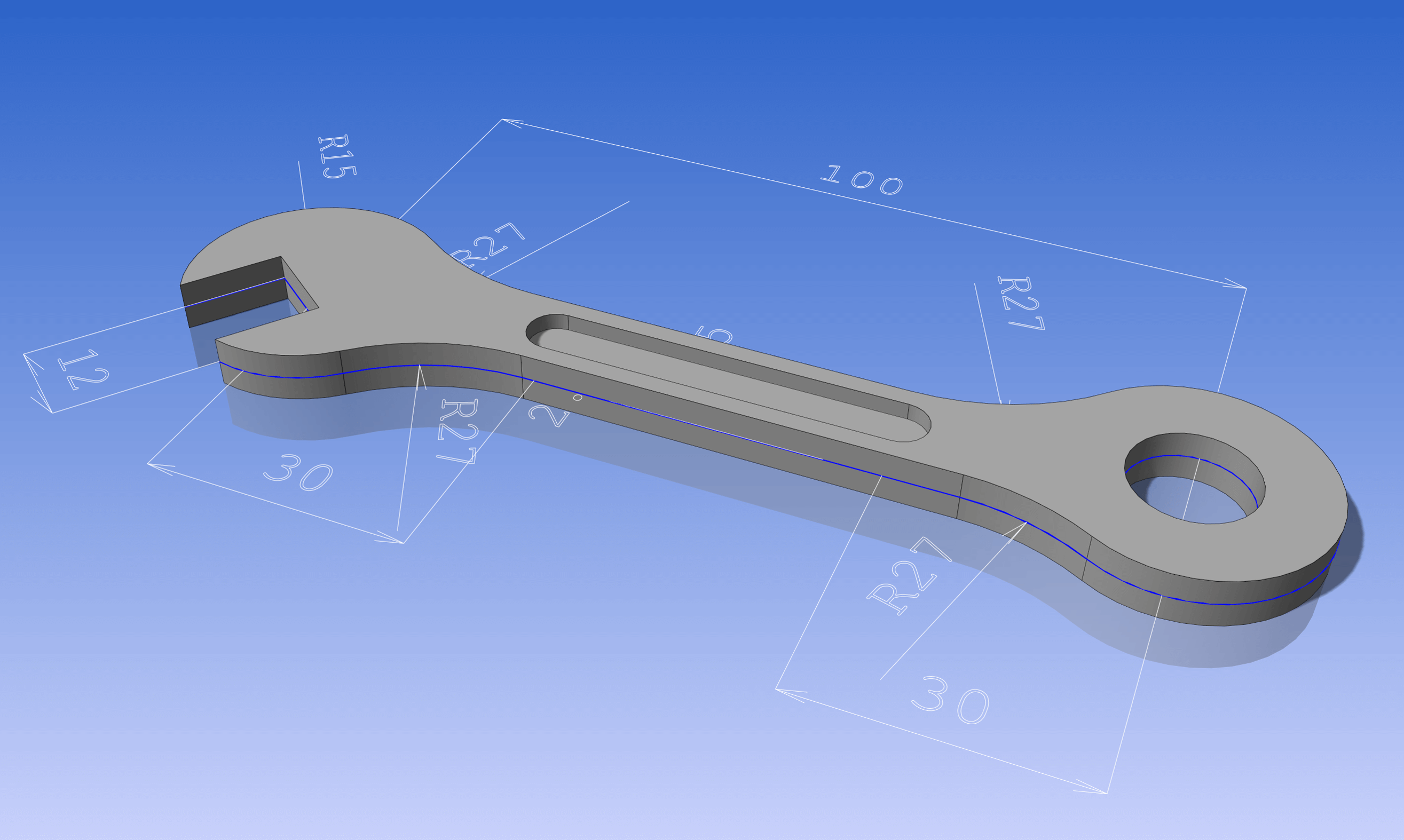
- Enhanced 2D Constraints Sketching: Experience a higher level of precision with equal length and radius constraints, along with improved support for Fillet and Chamfer. Also enable easier geometry selection, trimming, and constraint dimension adjustment within a sketch saving lot of your time.
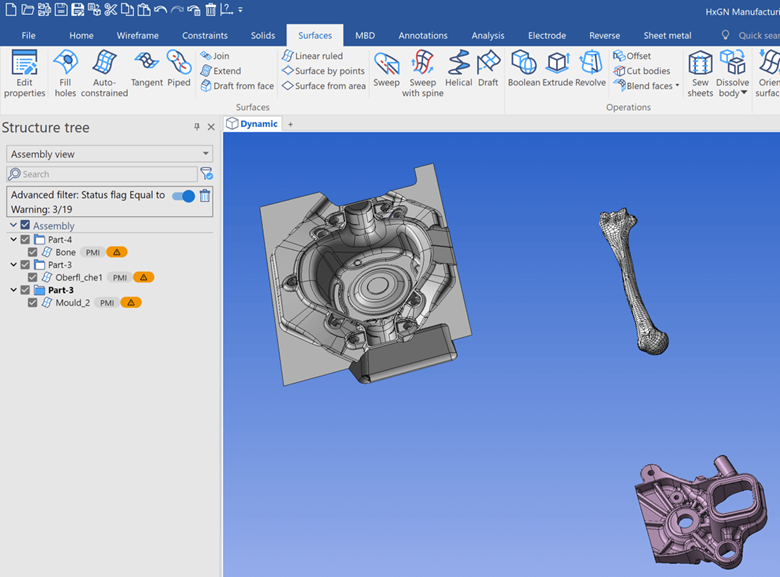
- Enhanced Model Repair Workflow: Easily identify problematic areas in your models with our dynamic highlighting feature. The reviewed workflow allows progressing even if resultant bodies are invalid, making model repair efficient and less complicated.
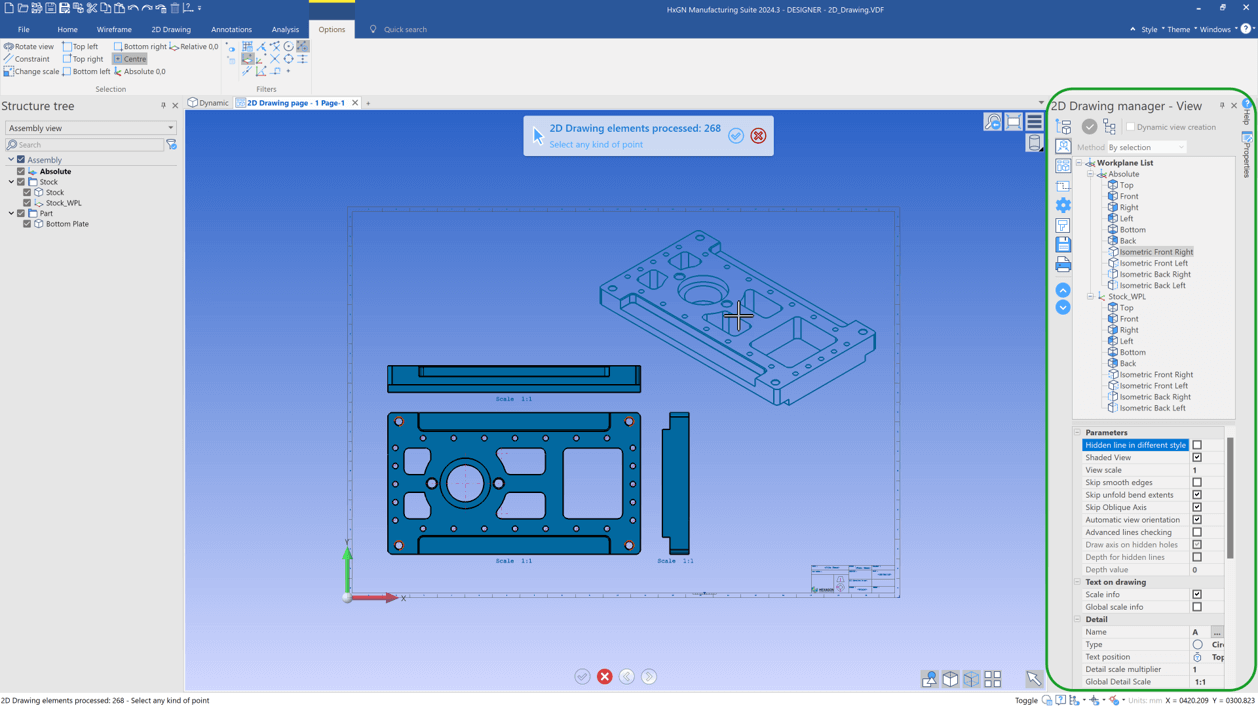
- 2D Drawing Improvements: Significant enhancements in 2D Drawing with increased flexibility, improved structure tree compatibility, enhanced filtering functionality, and a user-friendly interface. Experience seamless interaction with elements, efficient organization of components, and a highly optimized drafting workflow.
Recreate Updates
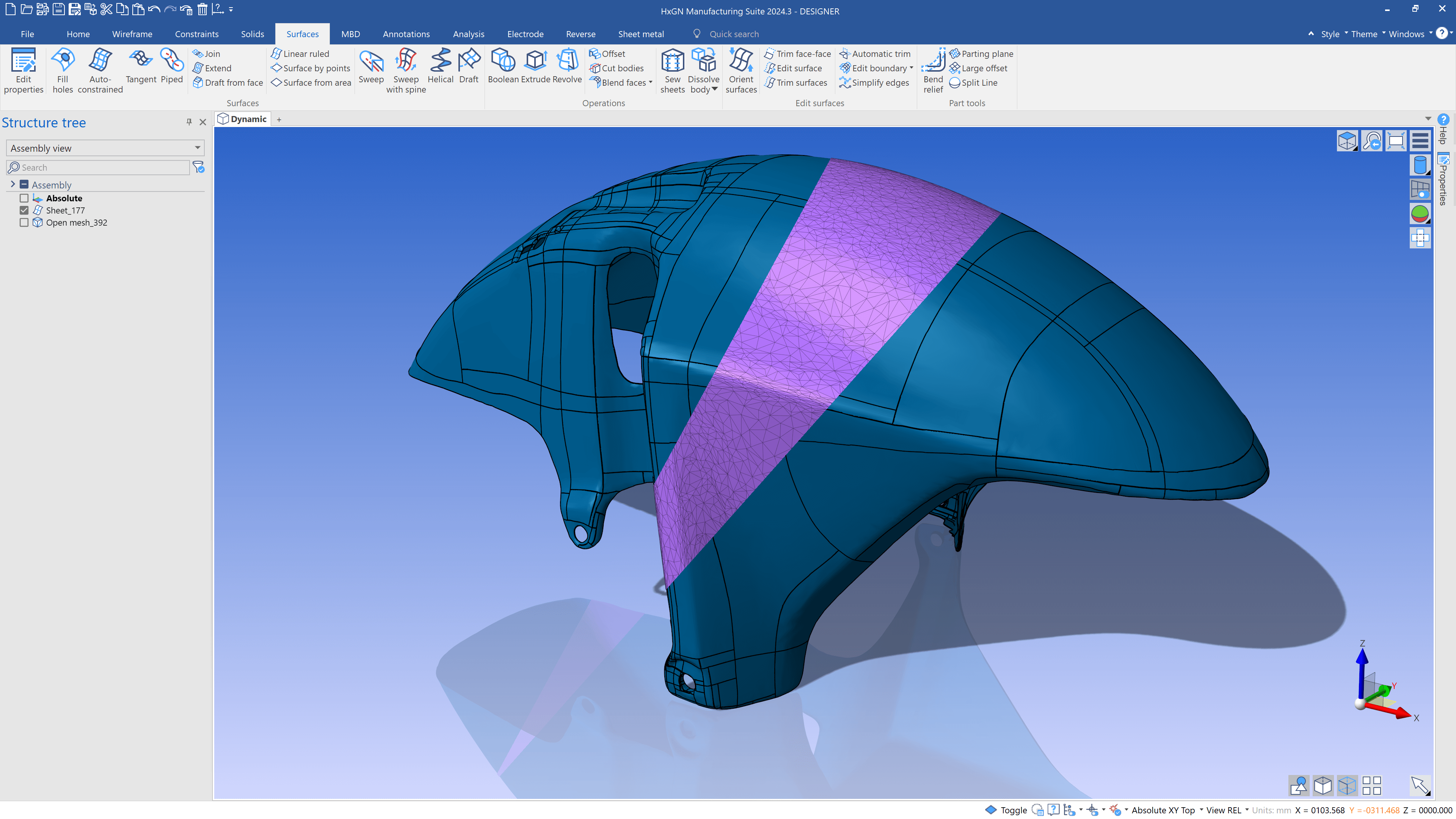
- New Automatic Surfacing Technique: Witness significant improvement in surfacing results and reduction in calculation times, thanks to our new algorithm that automatically wraps surfaces onto meshes, greatly enhancing your 3D modelling capability.
Sheet Metal Updates
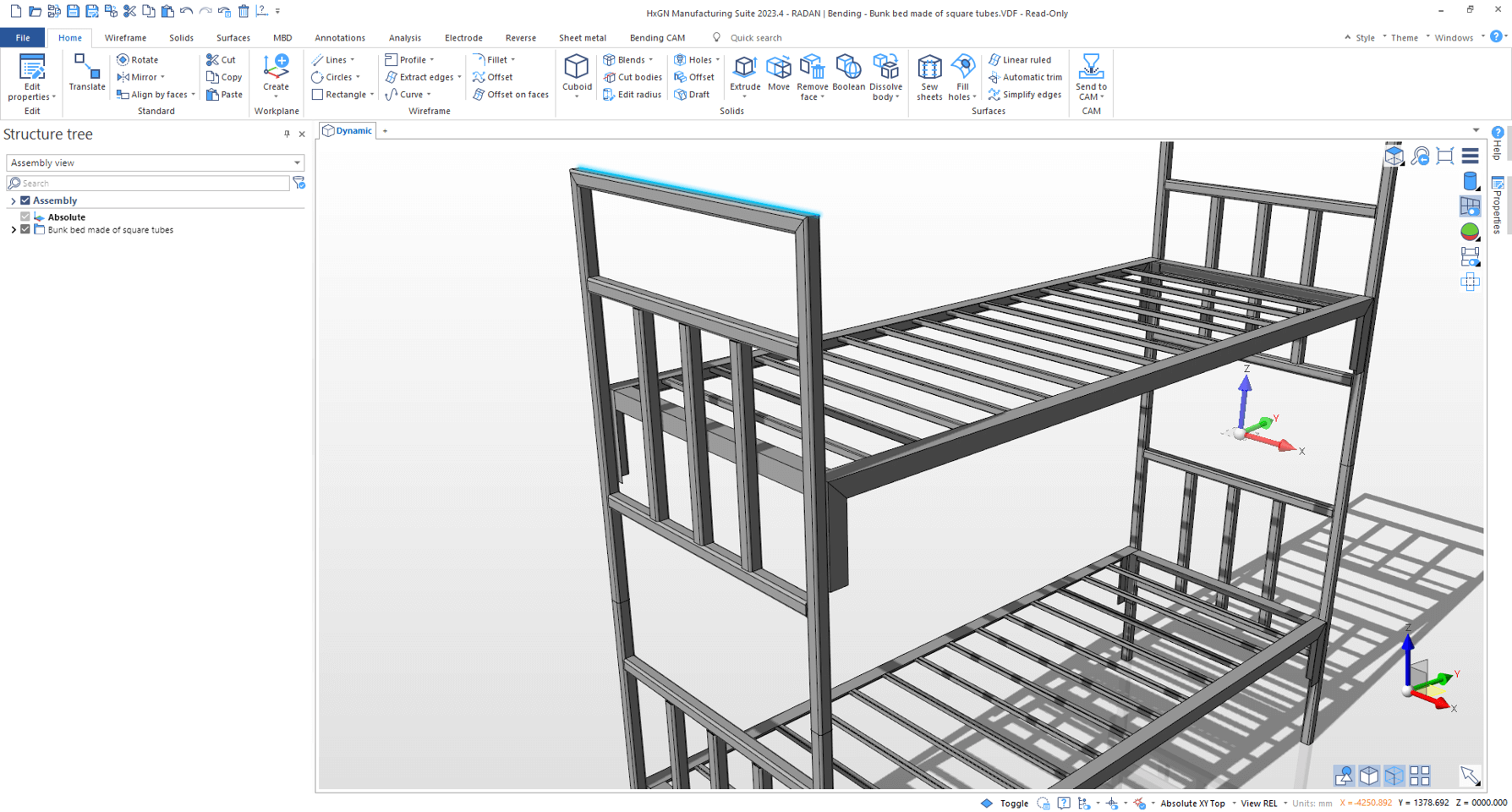
- Improved Automatic Tube Recognition: Experience our innovative feature which recognizes Rectangular Hollow Section (RHS) parts even if the inner radii vary, reducing manual input and speeding up your design process.
- Step Files In Manufacturing Pack: Move freely between workflows with the inclusion of STEP files in the Manufacturing Pack, extending the data export in variant formats and workflows.
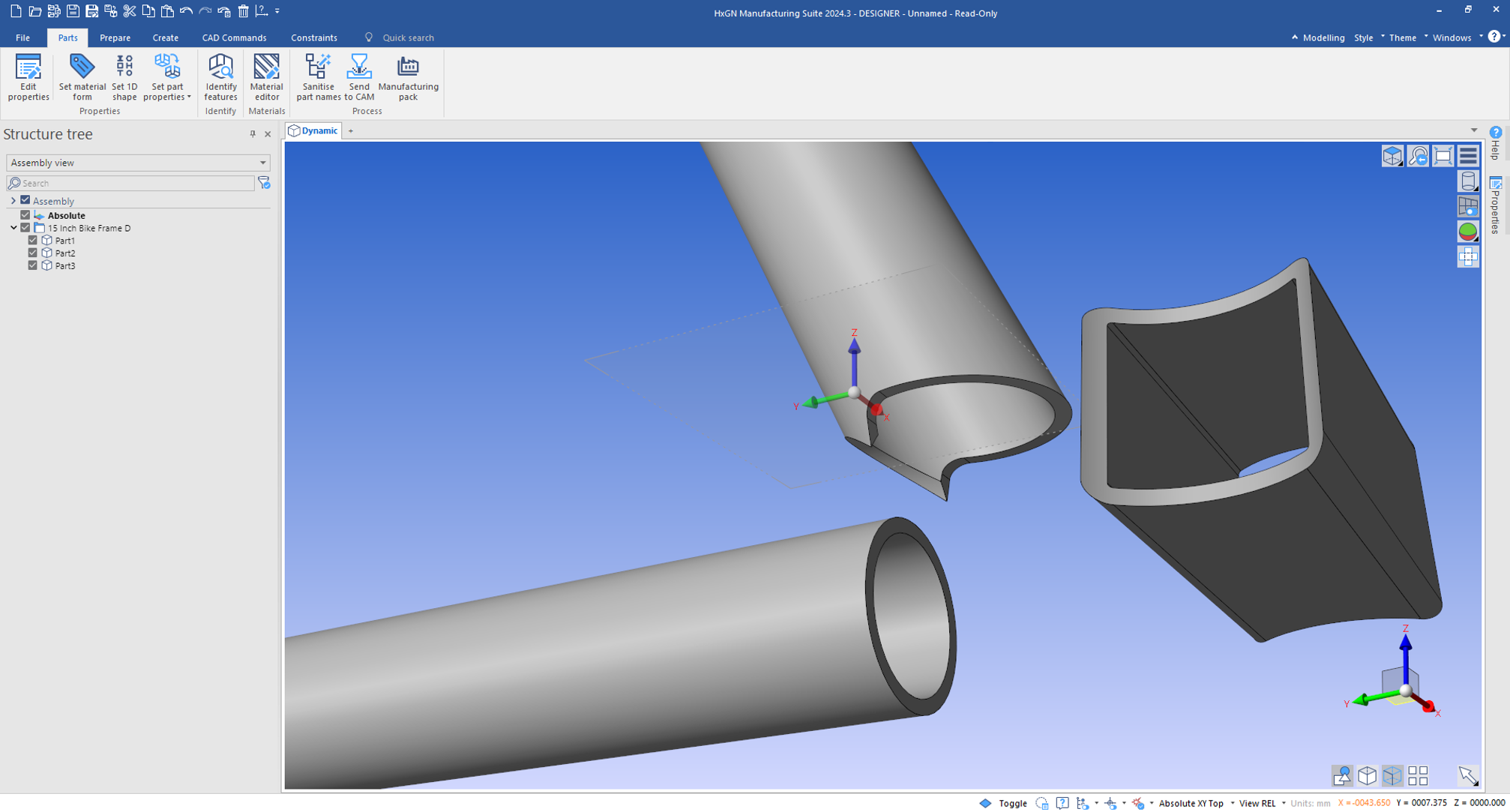
- Straightened Edges for Tubes: Prepare your tube structures for practical manufacturing, even if the initial design did not account for it. Our straightened edges feature addresses edges that could be difficult to manufacture, providing realistic and feasible design results.
Design, experiment, and create without boundaries with DESIGNER 2024.3. Ready to transform your digital design experience? Request a free demo today.
-
DESIGNER 2024.2
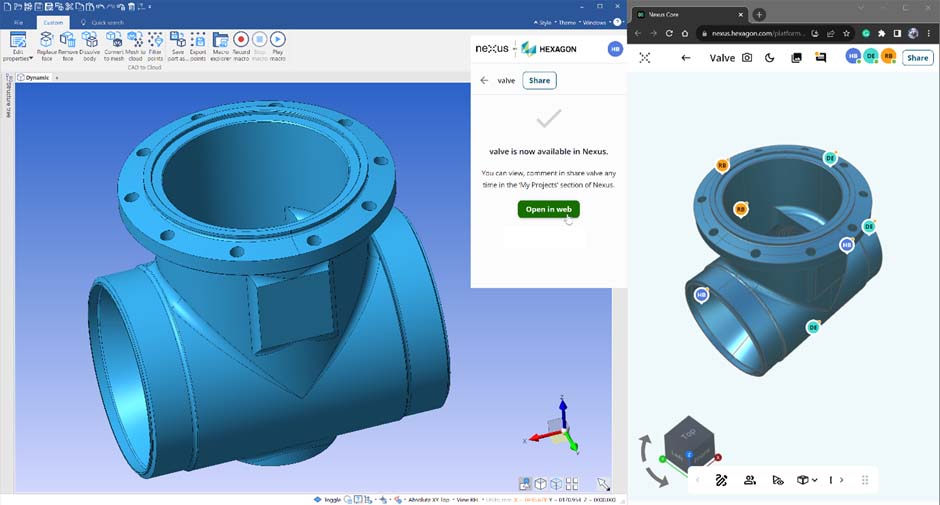
Collaborative Design Reviews with Nexus 3D
- Immersive collaborative experience in 3D Whiteboard within Nexus.
- Real-time project status during concurrent design reviews.
- Share design changes and queries directly without any CAD software requirement.
- Capture key moments instantly to revisit whenever needed.
Custom Settings Migration
- Automatic recognition and migration of customised settings on new installs.
- A smooth upgrade path for users with custom settings.
- No need to worry about customisation with version upgrades.
Add macros to the ribbon
- Instant access to your most frequently used custom scripts.
- Add up to 10 macros as buttons for ease of use.

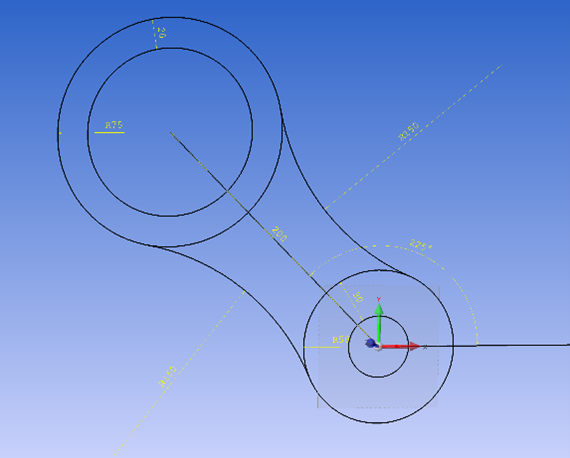
Constraints sketching
- First introduction of Constraints Sketching in DESIGNER.
- Create a sketch and apply constraints and dimensions.
- This gives more control when generating wireframe geometry.
Superior User Experience
- UX updates for more efficient CAD operations.
- Improved feedback throughout.
- More powerful suite of CAD commands.
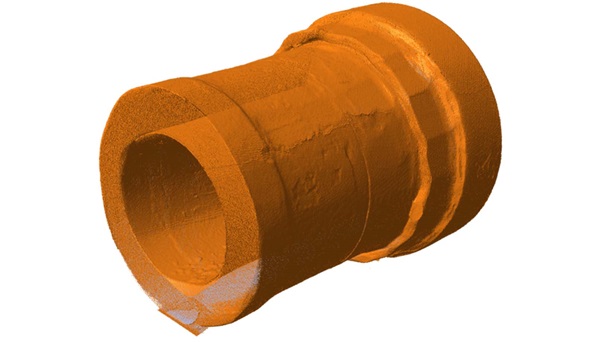
Recreate
- Seamless integration with Leica's Terrestrial Laser Scanners (TLS): BLK360 & RTC360.
- Enhanced reverse engineering tools for mesh splitting and creating solids from sections.
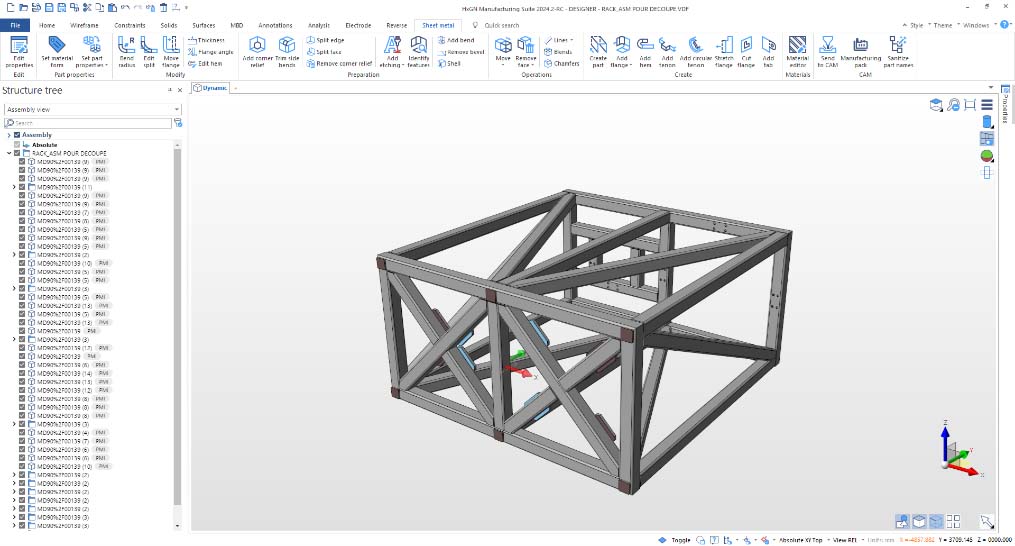
Optimization in Sheet Metal
- Auto sanitisation of part names in assemblies, ensuring no erroneous parts get produced.
- Unique naming for unique parts.
DESIGNER 2024.2 is a major step forward in intuitive, collaborative design. Offering seamless migration of customised settings between versions and improved modelling commands, enhances your design workflow with intuitive tools that increase productivity, reduce costs, and foster collaboration.