

Le novità di Inspire
Esplorate le ultime funzioni della vostra versione di Inspire.
Contattateci
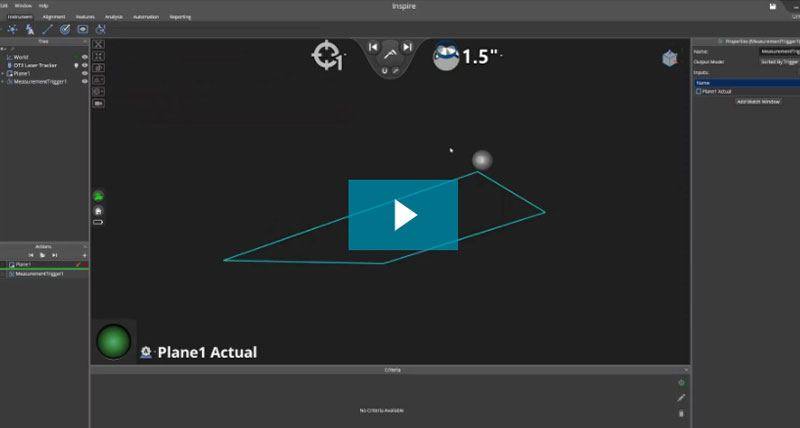
Come usare i trigger di misura
Le misure sono attivate quando il tastatore supera il confine della superficie specificata.
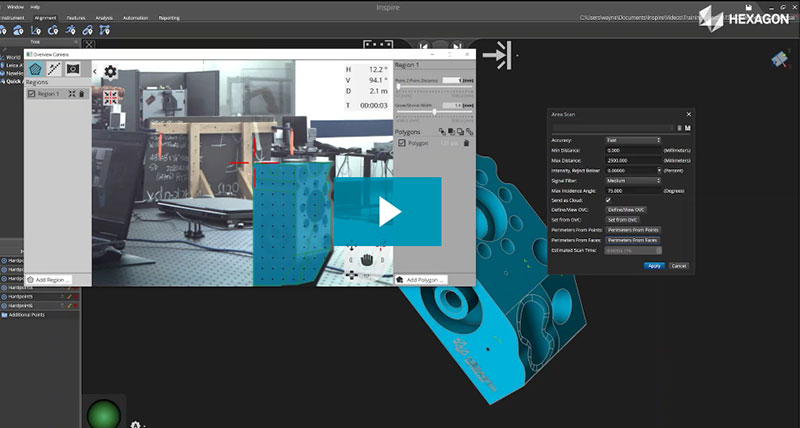
Utilizzo dei perimetri in Inspire
Un perimetro è una regione da scansionare con un dispositivo di scansione automatica. Inspire ha aggiunto le funzioni Perimetro per aiutare a pianificare le verifiche future.
-
Inspire 2026.1
Overview
Inspire 2026.1 delivers a major update across cloud processing, hardware integration, and inspection automation. This release introduces a redesigned point cloud architecture, enabling non-destructive workflows, improved performance, and expanded scalability for large datasets.
Additional investments include ATS800 targetless scanning integration, automation of inspection workflows, and modernization of the application platform to support improved responsiveness and future extensibility
- ATS800 targetless scanning integration
- Non-destructive cloud architecture
- Inspection workflow automation
- Platform modernization and scripting enhancements
Platform & Performance Improvements
- Migration to .NET 10
- Improved memory and runtime performance
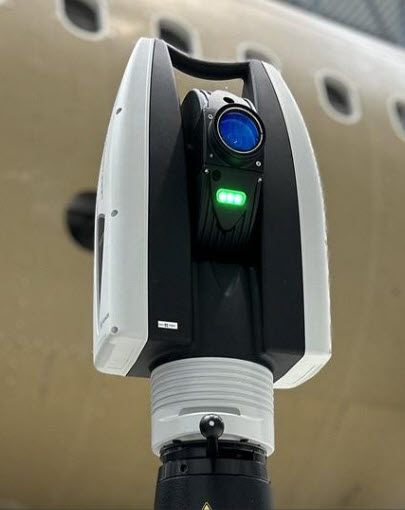
ATS800 Integration (Initial Support)
Inspire 2026.1 introduces initial support for the Leica ATS800 laser tracker, enabling targetless measurement workflows through integration with the OVC (Overview Camera).
Key Capabilities:
- Area and line scanning with a unified scan profile
- Selection of circles and slots as part of a Measure Perimeters action
- Expanded perimeter construction tools
- Scan into a unified cloud or directly into features
- OVC synchronization and automatic instrument discovery
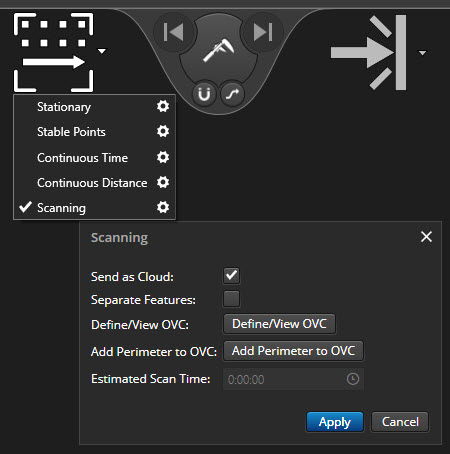
A Unified Scanning Profile Provides Direct Access to Scanning Workflows:
-
Legacy scan profiles (such as ATS600 ring/patch scans) have been removed and a single OVC scan profile standardizes all supported scanning interactions. This profile supports both area scans (closed perimeters) and line scans (open perimeters). Scans can be mapped directly into a single point cloud, or assigned to individual feature constructions during acquisition.
-
-
This significantly reduces user decision points during scanning and ensures consistent scan acquisition behaviour across all ATS800 workflows.
Measure Perimeters Action has been Expanded:
-
Integrates selection of nominal geometry (slots and circles) directly within the scan workflow. Circles and slots can be scanned directly using a cross line scan pattern. Additional improvements were made to perimeter construction using CAD edge selection, which make perimeter construction even easier.
Additional Instrument behaviour & Integration Improvements:
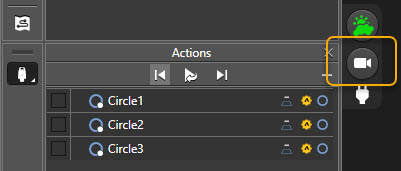
Automatic discovery of ATS800 devices on the network has been implemented and real-time synchronization with the OVC controller for perimeter definitions has been provided. This includes direct access to the OVC camera through a button at the side of the Actions:
Point Cloud Architecture Overhaul
One of the largest changes in Inspire 2026.1 is the redesign of the cloud architecture. This update changes how cloud data is organized, stored, processed, and edited, with the goal of reducing hierarchy complexity, preserving more source data, and making cloud workflows easier to understand and maintain. In tern, users spend less time managing data structures, benefit from improved storage efficiency, and can work more effectively with larger or more complex datasets.
Simplified Cloud Structure
Cloud Features and separate output clouds have been removed and replaced by a single unified cloud object. This simplifies the tree structure, makes cloud objects easier to find, and centralizes cloud display settings, filtering controls, and cloud-related properties in one place. In practical terms, the simplified structure reduces ambiguity about which cloud represents the active result and lowers the amount of tree navigation required to inspect or modify cloud settings.
-
Individual scans are now represented as scan passes that store raw instrument data. These scan passes serve as the source for processing and reprocessing operations rather than acting as preprocessed cloud. This creates a cleaner separation between source measurements and computed cloud results.
-

Raw Data Preservation and Non-Destructive Editing
Raw data preservation has been further improved in 2026.1. Editing cloud properties including voxel filtering, scanline filtering and deta deletion has been redesigned so these edits remain associated with the scan pass. In earlier versions, users could lose deletion work when reprocessing cloud data. No other metrology software offers this ability.
-
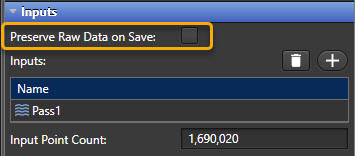
Raw, unfiltered scan data is now preserved by default, and the previous “Save Raw Measurements” workflow has been replaced with a per-cloud setting called Preserve Raw Data On Save. When raw scan data is stored in the project file or offloaded to disk, Inspire now compresses that data, typically reducing disk usage significantly. This gives users more control over whether raw data is written into the saved project and the benefit of improved performance at the same time.
Scanline filters are now available directly in the scan pass properties, and modifying those settings automatically reprocesses the original raw data.
-
A representative measured point is selected based on its relationship to the voxel average, helping ensure that stored voxel points remain true measured values rather than interpolated substitutes.
-
Scan passes now expose available metadata directly in their properties, including information derived from raw scan data and post-filtering stages. When a scan pass is selected, Inspire displays a sampled representation of its points in the graphics area to help visualize the source data behind the cloud.
-
Cloud editing operations such as point deletion and boundary removal are now non-destructive. Users can delete points or remove boundaries and later restore original data by using Restore Deleted Points in the scan pass properties.
Performance Improvements
Projects containing cloud data benefit from substantially improved performance in Inspire 2026.1. Load and save times can improve by up to 50%, memory usage and file size can in some cases be reduced by up to 50%, voxelization performance can improve by 30% to 235%, and rendering performance for large point cloud scenarios can improve by 5x or more.
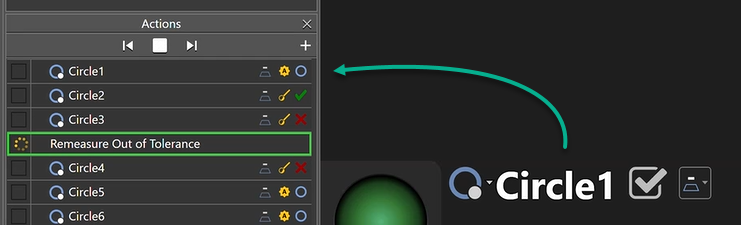
Remeasure Out of Tolerance Action
Inspire 2026.1 introduces a new Remeasure Out of Tolerance Action that automates the process of identifying, remeasuring, and validating failed inspection features. It then guides the user through a structured remeasurement workflow as follows.
When the action begins:
-
The system evaluates all measured features and identifies all out-of-tolerance features based on their tolerance state.
-
The first feature in the target list is set as the active measurement target.
-
The user is guided to remeasure that feature.
-
After completion, the workflow advances to the next feature in the list.
-
If any feature remain out-of-tolerance when the end of the list is reached, the workflow restarts at the beginning, repeating until all features pass, or the maximum retry count is reached.
This capability is designed to improve inspection efficiency, enforce repeatability, and reduce manual intervention during validation workflows. It ensures that all failed features are revisited in a consistent and repeatable manner.
Additional Improvements of Note
CAD Support Updates
Updated import support has been added for:
ACIS 2025 NX 2512 Revit 2026 AutoCAD 2026 Parasolid 38 SolidWorks 2026 Vector Visualization with Transparency Slider and Always On Top Option
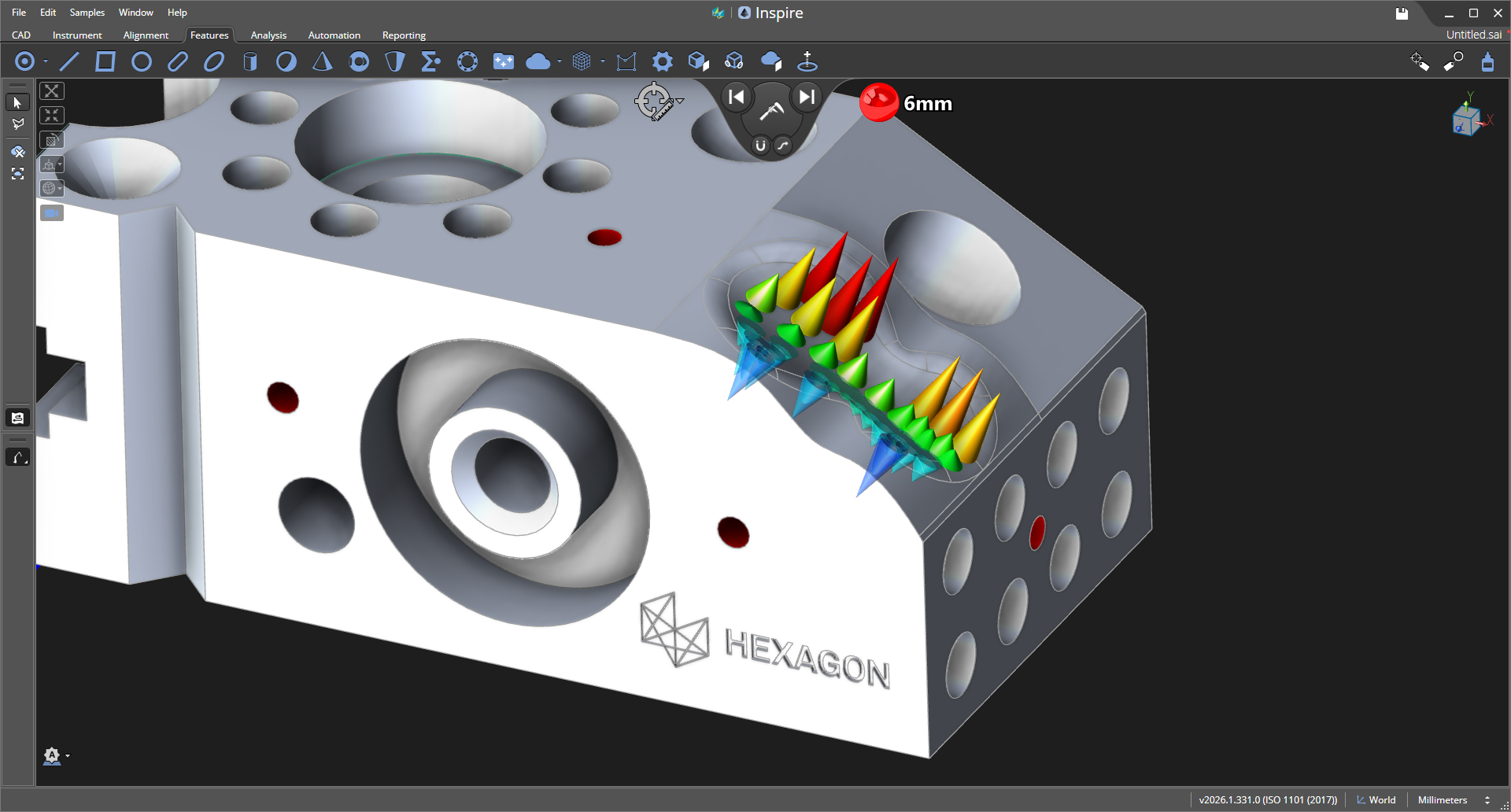
Comparison vector controls have been expanded with a transparency slider and an Always On Top option. These changes provide more flexibility when reviewing vector results in dense scenes or when overlays would otherwise be difficult to interpret.
A new transparency control allows users to dynamically adjust the opacity of comparison vectors.
-
Improves visibility when vectors overlap dense geometry or point clouds
-
Enables better inspection of underlying features while still observing deviation direction and magnitude
-
Reduces visual clutter in high-density inspection scenes
A new Always On Top toggle ensures vectors remain visible regardless of scene depth or occlusion.
-
Prevents vectors from being hidden behind geometry
-
Eliminates the need to rotate or isolate parts to view results
-
Improves workflow efficiency during inspection review
Create Cloud from Mesh
A new Create Cloud from Mesh capability allows users to generate a cloud directly from mesh vertices. This adds another path for converting geometry into cloud-based workflows without requiring original scan acquisition data.
Laser Tracker Simulator
The Laser Tracker Simulator has been updated with a more modern user interface aligned with the rest of Inspire. Simulation behaviour has also been expanded to include intensity variation, dropouts, surface holes, surface waviness, and more accurate scan rate simulation. Closing the simulator now disconnects the instrument automatically.
Python Scripting Enhancements
Inspire 2026.1 adds several scripting enhancements that make it easier to automate workflows and manipulate inspection objects. New capabilities include duplicating objects with IN_Duplicate, generating cardinal points with MakeCardinalPoints(), assigning nominals with SetNominal(), and creating remeasurement actions programmatically.
GD&T Improvements
The release also expands criteria-related scripting support. Non-GD&T and GD&T criteria are now handled through more clearly separated APIs, including the new IN_GDTCriteriaDetail data wrapper.
Additional Scripting Updates
Additional scripting improvements include temperature support for points and the ability to change script temperature units through IN_SetScriptUnits.
-
Inspire 1.4.41.0
- Estrazione di elementi da più facce CAD e superfici parziali
- Nuove opzioni di visualizzazione per dimensioni e finestra grafica
- Aggiunta una nuova operazione di intersezione elementi
-
Inspire 1.4.41.0
- Estrazione di elementi da più facce CAD e superfici parziali
- Nuove opzioni di visualizzazione per dimensioni e finestra grafica
- Aggiunta una nuova operazione di intersezione elementi
-
Inspire 1.4.41.0
- Estrazione di elementi da più facce CAD e superfici parziali
- Nuove opzioni di visualizzazione per dimensioni e finestra grafica
- Aggiunta una nuova operazione di intersezione elementi
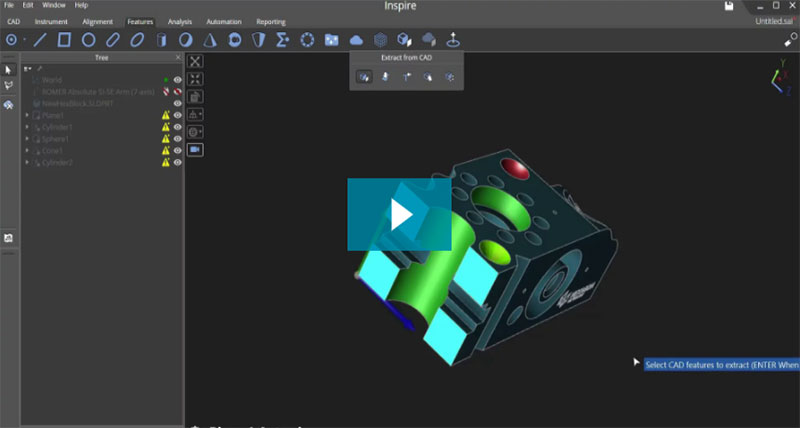
Estrazione avanzata delle funzioni CAD
Estrazione di funzioni e superfici organiche usando più superfici CAD. Inspire visualizza in modo più intelligente le funzioni nominali per farle corrispondere alle...
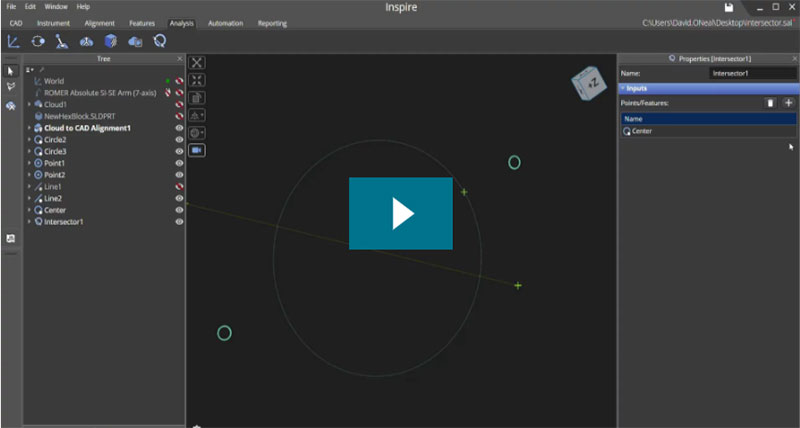
Nuova funzione intersezione
La funzione intersezione ora permette agli utilizzatori di Inspire di creare punti di intersezione multipli a partire da due funzioni.
-
Inspire 1.4.41.0
- Estrazione di elementi da più facce CAD e superfici parziali
- Nuove opzioni di visualizzazione per dimensioni e finestra grafica
- Aggiunta una nuova operazione di intersezione elementi
Estrazione avanzata delle funzioni CAD
Estrazione di funzioni e superfici organiche usando più superfici CAD. Inspire visualizza in modo più intelligente le funzioni nominali per farle corrispondere alle...
Nuova funzione intersezione
La funzione intersezione ora permette agli utilizzatori di Inspire di creare punti di intersezione multipli a partire da due funzioni.
-
Inspire 1.3.154.0
- Creazione di elementi e dimensioni da singole sezioni trasversali
- Miglioramento delle visualizzazioni delle funzioni e della logica di visualizzazione dei valori
- Nuove funzionalità all'interfaccia ATS600 e viste aggiornate delle telecamere
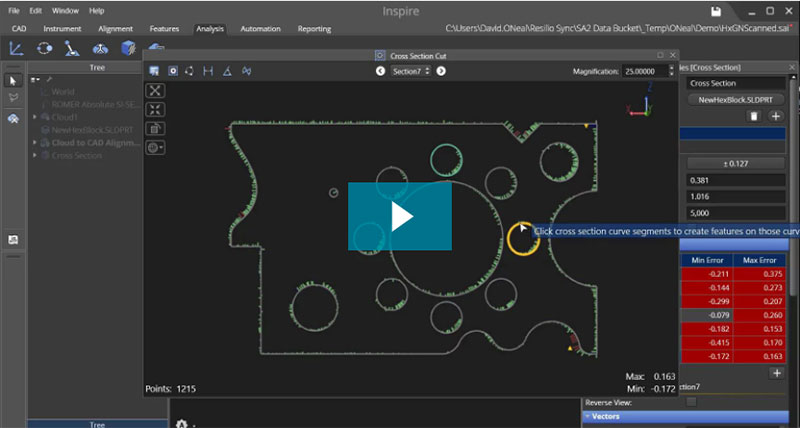
Ulteriori analisi della sezione trasversale
Inspire consente ora agli utilizzatori di eseguire un'analisi più approfondita di una singola sezione trasversale. Estrarre funzioni e creare dimensioni direttamente dalla...
Ulteriori analisi della sezione trasversale
Inspire consente ora agli utilizzatori di eseguire un'analisi più approfondita di una singola sezione trasversale. Estrarre funzioni e creare dimensioni direttamente dalla...

Community
Accedete agli articoli, contattate l'assistenza clienti, ricevete le ultime notizie su Inspire e scaricate il software sul sito della Community Inspire.